Luther Monson, Staff Software Engineer at SUSE

Luther Monson

Go by way of PHP · Containers · VMs · Windows · Kubernetes

P99 From 280 ms to 58 ms by Making the Queue Fair

ePHPm had the best throughput in a Laravel runtime comparison and the worst tail of the fast group. The cause was a bounded channel that let new requests cut in line.

9-Minute Read

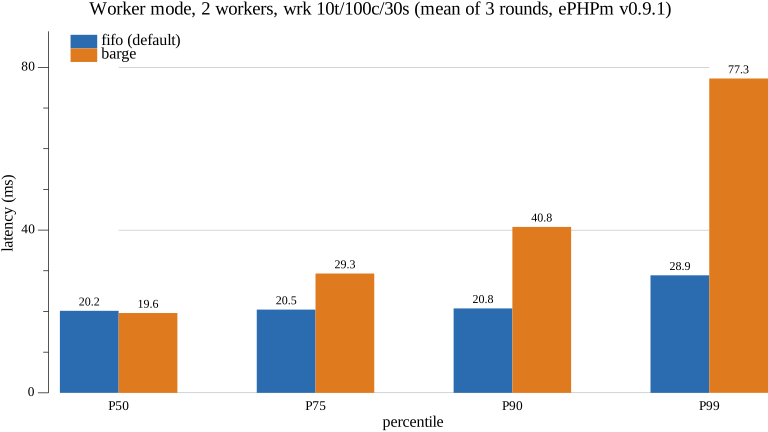
Bar chart of P50, P75, P90 and P99 latency for FIFO versus barging admission in ePHPm worker mode

A third-party Laravel runtime comparison put ePHPm’s worker mode at the top on throughput. It was about 19% ahead of FrankenPHP on /api/static. It was also at the bottom of the fast group on tail latency, with a P99 of 157 ms against FrankenPHP’s 57 ms. Best throughput plus the fattest tail is a shape worth chasing, because fast execution can’t produce it. Making requests faster lowers the mean and the tail. Only waiting can pull them apart. Specifically, unfair waiting.

Stop Running PHP on tokio's spawn_blocking - Own Your Thread Pool

Why ePHPm moved PHP execution off tokio's generic blocking pool onto threads it owns. How the switch rolled out behind a knob and what it did to memory, throughput and overload.

10-Minute Read

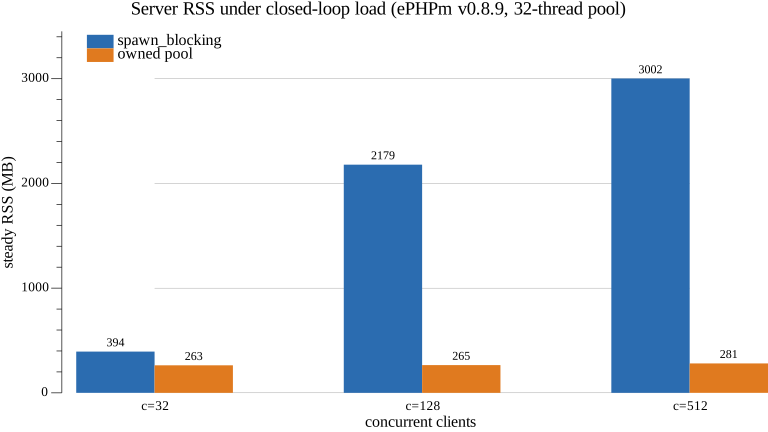
Bar chart of server RSS at 32, 128 and 512 concurrent clients: spawn_blocking grows with concurrency, the owned pool stays flat

For most of its life, ePHPm ran every PHP request on tokio’s spawn_blocking pool. It works. It passes tests and it serves benchmarks fine. It’s the first thing anybody reaches for when they need to call blocking code from async Rust. It’s also quietly wrong for a language runtime. The problems only show up under overload or after a crash. Over the last three weeks it got replaced with a pool of OS threads that ePHPm owns. That pool shipped first behind a config flag, then as…

What Does One More WordPress Site Cost?

I measured what each extra WordPress tenant on one ePHPm instance costs in RAM, file descriptors, CPU and disk. The sweep ran from 10 to 1000 sites.

9-Minute Read

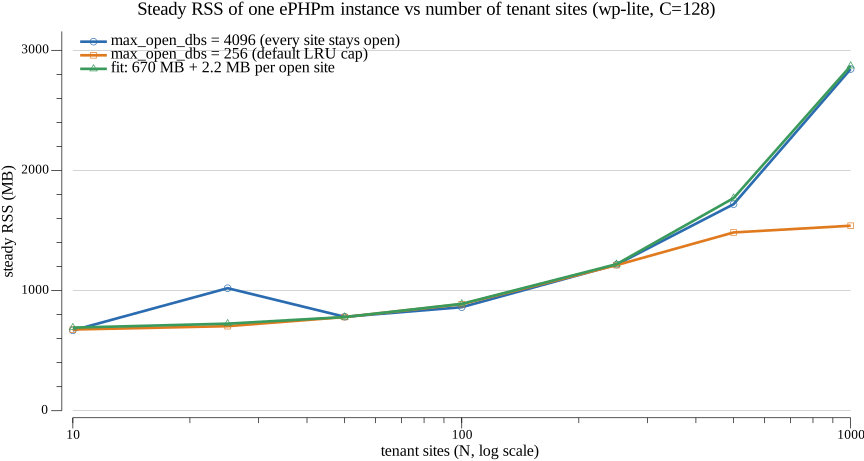
Line chart of ePHPm steady RSS against tenant site count: linear at about 2.2 MB per site with every site open, flat past the default LRU cap of 256

ePHPm v0.7.0 shipped per-site multi-tenancy. Point [server] sites_dir at a directory and every Host maps to its own docroot and its own Turso database file. One process serves all of them. The first question anybody asks about that is “how many sites fit on a box?” The honest way to answer it is to turn the question around. What does one more site cost? If you know the marginal RAM, file descriptors, CPU and disk for a tenant, the box size falls out of arithmetic.

What an Overloaded PHP Server Actually Returns

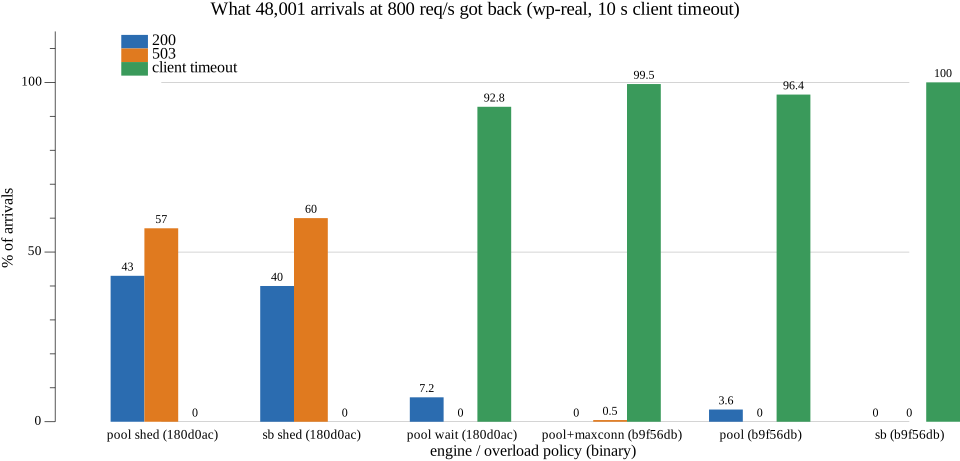
Closed-loop benchmarks can't show you overload. An open-loop load generator with an error taxonomy showed ePHPm returned nothing at all, and then verified the fix.

11-Minute Read

Bar chart of what 48,001 arrivals at 800 req/s got back: before the fixes almost everything was a client timeout, after them every arrival got a 200 or a fast 503

Ask most people what their PHP server does when it’s overloaded and you’ll hear “it returns 503s.” Ask them how they know and it usually comes down to a config setting they read about. I was in that camp for ePHPm. We had a [server.limits] max_connections knob, and the docs said it returned 503 at the cap. Every benchmark we had ever run reported zero errors under heavy load. Then I wrote a load generator that could produce overload. The honest answer was that an…

My Benchmark Was 4x Wrong Because of WSL

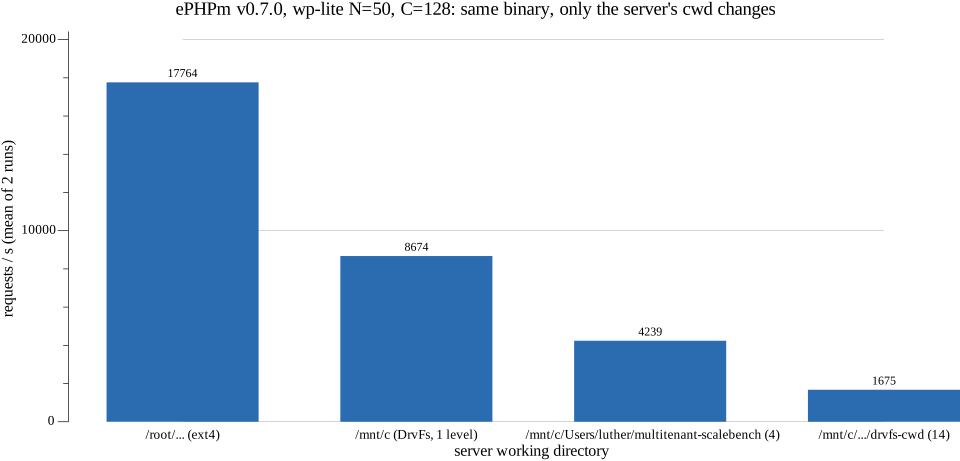
Launching the server with its working directory on /mnt/c cost ePHPm about 4x on a light workload. The report built a wrong explanation on top of it, and the strace shows why.

8-Minute Read

Bar chart of ePHPm requests per second by working directory: native ext4 far ahead of DrvFs, with DrvFs throughput falling as the cwd path gets deeper

I do most of my benchmarking on a Windows box in WSL2. It’s the machine on my desk with 32 threads and 62 GB of RAM. Everybody who does that learns the first rule early: don’t put your data on /mnt/c. DrvFs is the 9p-backed mount that exposes the Windows drives inside WSL, and it’s slow for file-heavy work. So the databases, the docroot and the build output all live on the WSL ext4 disk. My scaling harness for ePHPm even says so in capital letters in its README.

Recent Posts

Categories

About

Luther is a 20+ year software veteran specializing in backend APIs and architecting products. Employed at SUSE as the Team Lead for the Containers on Windows Team working on Rancher + Kubernetes