WebSockets in ePHPm, From Zero to a Working Chat
How to run WebSockets in ePHPm with a single PHP file. It covers turning them on, sharing the login session, pushing messages from normal HTTP requests, serving over TLS and the limits to know about.
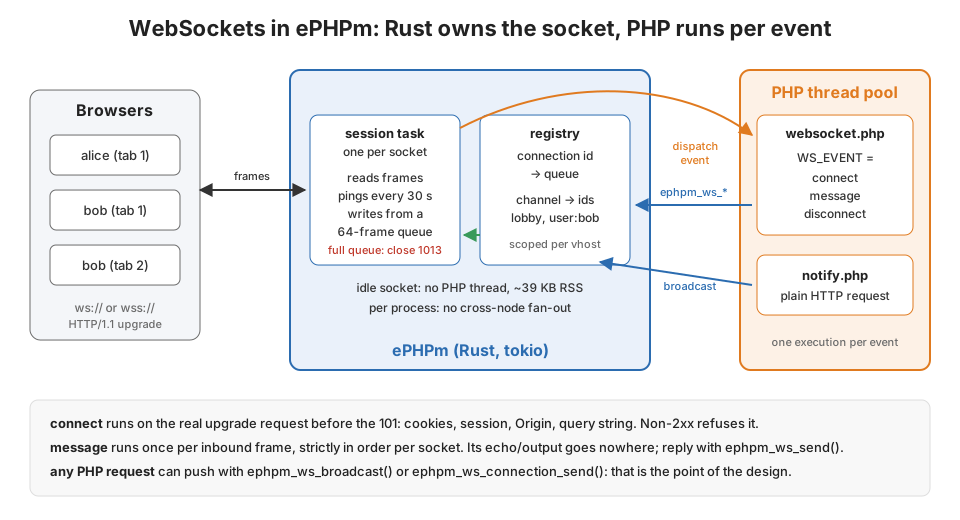
I covered the design of ePHPm’s native WebSockets in a few paragraphs of the odds
and ends post. Rust owns the socket and PHP runs once per event. An idle
connection never costs you a PHP thread. That was the why. This post is the how. We’ll build a small chat app with
login, per-user push notifications from ordinary HTTP requests and a browser client. Then we’ll serve it over TLS.
Last come the limits, the sharp edges and how to debug it when the browser only tells you 1006.
Everything here runs on ePHPm v0.11.3 (the current release). I ran it on Windows and on Linux. The WebSocket code on
main hasn’t changed since that tag, so this is current. Every snippet below is the file I tested, and the
transcripts are from those runs.
Turn it on
WebSockets are opt-in and still marked experimental. The smallest config:
# ephpm.toml
[server]
listen = "127.0.0.1:8080"
document_root = "public"

[server.websocket]
enabled = true
ephpm serve -c ephpm.toml
With the feature on, an HTTP/1.1 GET with Connection: Upgrade and Upgrade: websocket takes a separate route.
ePHPm looks for an entrypoint in the vhost’s document root, websocket.php by default. [server] websocket_files
changes the name, index_files style. If the file isn’t there, every upgrade gets a 404. It never falls through to
index.php or a static file. The URL path doesn’t matter either. /ws, / and /chat/room-7 all run the same
script. The script can read the path and query string if it cares.
Two startup checks are worth knowing. [php] mode = "worker" together with WebSockets is a hard config error, because
worker mode never runs the entrypoint. Use the default per-request mode. And an empty websocket_files with the
feature enabled is also an error rather than a silent 404 machine.
One script, three events
Everything goes through one file. ePHPm sets $_SERVER['WS_EVENT'] to connect, message or disconnect. It sets
$_SERVER['WS_CONNECTION_ID'] to 32 hex characters (128 random bits). On message it also sets WS_OPCODE (text
or binary). The frame payload is the request body, so you read it with php://input.
The part that makes this pleasant is that every event is an ordinary PHP request on the normal request path. The
upgrade request’s URI, query string, headers and cookies are replayed on every event. $_COOKIE, $_GET and
$_SERVER['HTTP_*'] in a message handler look exactly like they did at connect. So your session works.
Here’s the whole server side of the chat:
<?php
// public/websocket.php: one script, three events.
$event = $_SERVER['WS_EVENT'];
$conn  = $_SERVER['WS_CONNECTION_ID'];

// The upgrade request's cookies are replayed on every event, so the PHP
// session is readable here. read_and_close: never hold the session lock.
$user = null;
if (isset($_COOKIE[session_name()])) {
    session_start(['read_and_close' => true]);
    $user = $_SESSION['user'] ?? null;
}

switch ($event) {
    case 'connect':
        // Browsers attach cookies to a cross-site upgrade too, so insist on our own Origin.
        $scheme = ($_SERVER['HTTPS'] ?? 'off') !== 'off' ? 'https' : 'http';
        if (($_SERVER['HTTP_ORIGIN'] ?? '') !== "$scheme://{$_SERVER['HTTP_HOST']}") {
            http_response_code(403);
            echo 'bad origin';
            return;
        }
        if ($user === null) {
            http_response_code(401);
            echo 'log in first';
            return;
        }
        ephpm_ws_subscribe('lobby');        // everyone
        ephpm_ws_subscribe("user:$user");   // just this user, every tab
        ephpm_ws_send(json_encode(['type' => 'notice', 'text' => "welcome, $user"]));
        http_response_code(200);            // 2xx accepts the upgrade
        return;

    case 'message':
        $msg = json_decode(file_get_contents('php://input'), true);
        if (!is_array($msg) || ($msg['type'] ?? '') !== 'chat') {
            ephpm_ws_send(json_encode(['type' => 'error', 'error' => 'unknown message']));
            return;
        }
        $text = mb_substr(trim((string) ($msg['text'] ?? '')), 0, 500);
        ephpm_ws_broadcast('lobby', json_encode([
            'type' => 'chat', 'from' => $user, 'text' => $text, 'at' => time(),
        ]));
        return;

    case 'disconnect':
        // Best-effort. The connection is already gone from every channel.
        error_log("ws: $user left ($conn)");
        return;
}
There are a few things here you can’t get from reading the function list.
connect runs before the handshake finishes. It runs on the real upgrade request, and its status code decides the
upgrade. A 2xx gets a 101 Switching Protocols. Any other status goes back to the client verbatim with its headers and
body. No socket is ever created. This is the only place you can refuse a connection, so auth goes here.
The connection is live during connect. It’s registered before your script runs, so you can subscribe it to
channels and even queue a welcome frame. The frame goes out right after the 101.
Output from message and disconnect goes nowhere. The response from those events is discarded. An echo in a
message handler doesn’t reach the client. I checked: a handler that only echoes sends nothing. To reply, call
ephpm_ws_send(). The same goes for headers. On a successful connect the 101 is built fresh, so a Set-Cookie or
session_regenerate_id() there doesn’t reach the browser. Log people in over plain HTTP.
Check Origin. Browsers send cookies on a WebSocket upgrade from any site. The same-origin policy doesn’t apply to
WebSockets. If your auth is a cookie, any page the user visits can open a socket as them unless you check Origin.
ePHPm doesn’t do this for you. The check above compares against the request’s own scheme and host. That’s right for a
same-origin app.
Use read_and_close. Every message is a full request, and PHP’s file sessions lock. Opening the session read-only
means a chatty socket can’t block the same user’s page loads. I only call session_start() when there’s a session
cookie. That way anonymous upgrade attempts don’t create empty sessions.
Messages from one socket run strictly in order. The socket isn’t read again until the handler returns. Messages from different sockets run in parallel on the PHP thread pool.
Logging in and pushing from HTTP
Login is a plain HTTP endpoint. This one is a stand-in, since you’ll have your own:
<?php
// POST /login.php name=alice : a stand-in for your real login.
session_start();
$name = preg_replace('/[^a-z0-9_]/i', '', $_POST['name'] ?? '');
if ($name === '') { http_response_code(400); exit('name required'); }
session_regenerate_id(true);
$_SESSION['user'] = $name;
echo "logged in as $name\n";
The feature that sold me on this model is that any PHP execution can push to a socket, not just a WebSocket event.
Your “order shipped” handler, a cron script and a webhook receiver can all reach a connected browser. The guide
suggests storing the connection id in ephpm_kv_* under the user id. I went another way and subscribe each connection
to a user:<name> channel at connect time. That handles several tabs per user for free. Nothing needs cleaning up at
disconnect either, because the registry drops a closed connection from every channel itself.
<?php
// POST /notify.php user=alice text=... : an ordinary HTTP request pushing
// to every socket that user has open. In a real app this is your
// "order shipped" or "new comment" handler.
if (($_SERVER['HTTP_X_NOTIFY_KEY'] ?? '') !== getenv('NOTIFY_KEY')) {
    http_response_code(403);
    exit;
}
$user = preg_replace('/[^a-z0-9_]/i', '', $_POST['user'] ?? '');
$sent = ephpm_ws_broadcast("user:$user", json_encode([
    'type' => 'notice', 'text' => (string) ($_POST['text'] ?? ''),
]));
header('Content-Type: application/json');
echo json_encode(['queued_to' => $sent]), "\n";
ephpm_ws_broadcast() returns how many connections the frame was queued to. That’s queued, not delivered.
ephpm_ws_connection_send($id, ...) does the same for one connection id. The implicit forms are ephpm_ws_send() and
ephpm_ws_close(). They mean “the connection that fired this event”. Call one from a plain HTTP request and it throws
instead of quietly doing nothing:
Exception: ephpm_ws: no current websocket connection. The implicit form is only valid inside a
websocket event; from an ordinary HTTP request use the ephpm_ws_connection_*() form with an
explicit connection id
The rule is consistent. false means the connection couldn’t be reached. It’s gone, it’s another site’s, or its queue
is full. An exception means the call could never have worked. Connection ids and channel names are scoped to the
vhost. On a multi-tenant node, lobby on one site isn’t lobby on another. A leaked id from site A is useless to
site B.
The browser side
Nothing ePHPm-specific here, which is the point. One thing to watch: the reconnect.
<!doctype html>
<meta charset="utf-8">
<title>lobby</title>
<ul id="log"></ul>
<form id="f"><input id="t" autocomplete="off"><button>send</button></form>
<script>
const log = (s) => { const li = document.createElement('li'); li.textContent = s; document.getElementById('log').append(li); };
let ws, backoff = 500;

function connect() {
  const scheme = location.protocol === 'https:' ? 'wss' : 'ws';
  ws = new WebSocket(`${scheme}://${location.host}/ws`);   // the path is yours; any path runs websocket.php
  ws.onopen = () => { backoff = 500; log('connected'); };
  ws.onmessage = (e) => {
    const m = JSON.parse(e.data);
    if (m.type === 'chat')   log(`${m.from}: ${m.text}`);
    if (m.type === 'notice') log(`* ${m.text}`);
    if (m.type === 'error')  log(`! ${m.error}`);
  };
  ws.onclose = (e) => {
    log(`closed ${e.code}`);
    setTimeout(connect, backoff);           // 1013 and 1001 both mean "come back"
    backoff = Math.min(backoff * 2, 15000);
  };
}

document.getElementById('f').onsubmit = (e) => {
  e.preventDefault();
  const t = document.getElementById('t');
  ws.send(JSON.stringify({ type: 'chat', text: t.value }));
  t.value = '';
};
connect();
</script>
Reconnecting with backoff isn’t optional. Graceful shutdown doesn’t drain WebSockets, and a restart drops every socket.
A slow reader gets shed too (more on that below). I drove this page in headless Edge. Before logging in, the log shows
closed 1006 | closed 1006. After a fetch('/login.php') and a reload, it shows
connected | * welcome, carol | carol: hello from a browser.
Don’t pass a subprotocol (new WebSocket(url, ['chat.v1'])). ePHPm never sends Sec-WebSocket-Protocol back, and
a browser that asked for one fails the handshake. Edge closed with 1006 in my test. Put versioning in the URL or the
first message instead.
Here’s an excerpt of the run from a Go test client that does what two browsers would. It was the same on Windows and Linux:
[anon] dial refused: 401 Unauthorized body="log in first"
[evil-origin] dial refused: 403 Forbidden body="bad origin"
[alice] connected: 101 Switching Protocols subprotocol=""
[alice] <- {"type":"notice","text":"welcome, alice"}
[bob] <- {"type":"notice","text":"welcome, bob"}
[bob-tab2] <- {"type":"notice","text":"welcome, bob"}
[alice] -> {"type":"chat","text":"hi bob"}
[alice] <- {"type":"chat","from":"alice","text":"hi bob","at":1791764873}
[bob] <- {"type":"chat","from":"alice","text":"hi bob","at":1791764873}
[bob-tab2] <- {"type":"chat","from":"alice","text":"hi bob","at":1791764873}
POST /notify.php -> 200 {"queued_to":2}
[bob] <- {"type":"notice","text":"your build finished"}
[bob-tab2] <- {"type":"notice","text":"your build finished"}
wss://
ePHPm terminates TLS itself, so there’s nothing extra to set up. wss:// is served by the same listener as
https://. $_SERVER['HTTPS'] is set for the events, so the origin check above works unchanged:
[server.tls]
cert = "/etc/ephpm/cert.pem"
key  = "/etc/ephpm/key.pem"
listen = "0.0.0.0:443"
Upgrades are HTTP/1.1 only. RFC 8441 (WebSockets over HTTP/2) isn’t implemented. Browsers handle that fine. They open
a separate HTTP/1.1 connection for wss: when the server doesn’t offer it over h2.
Limits and backpressure
Every bound has a default under [server.websocket]:
| Key | Default | Notes |
|---|---|---|
max_connections |
10000 | all vhosts; over the cap the upgrade gets a 503 |
max_connections_per_site |
1000 | applies to a single-site server too |
max_message_size / max_frame_size |
1 MiB | inbound, and the largest payload PHP may push |
send_queue |
64 frames | per connection outbound queue |
ping_interval_secs / idle_timeout_secs |
30 / 120 | 0 disables either |
The second row caught me. A single-site server is still one “site” to the registry, so out of the box it accepts
1000 sockets, not 10000. My benchmark’s 1001st connection got a 503 and the log said
websocket connection limit reached for this site. If you run one app on a box, raise or zero
max_connections_per_site. There are also fixed limits of 64 channels per connection and 256-byte channel names.
Backpressure is the part I like best. When a client stops reading, its 64-frame queue fills. The next send isn’t
buffered. It returns false, and the broadcast doesn’t count that subscriber. The socket is closed with 1013 (Try
Again Later), and the close jumps ahead of the backlog. To see it, I connected a client that never reads. Then I
broadcast 1000 frames of 60 KB at it from one HTTP request:
GET /flood.php (1000 x 60 KB) -> accepted=109 refused=891
drained 45 data frames, then close code 1013
That’s Linux. Windows accepted 70 and delivered 6 before the 1013. The exact numbers depend on how much the kernel’s
socket buffers absorb. The shape is the point: one slow reader costs one connection, never the server’s memory. An
oversized payload is different. It returns false but doesn’t shed the connection, because that’s your bug, not the
peer’s.
What isn’t there
- No cross-node fan-out. The registry lives in one process. In an ePHPm cluster, a broadcast reaches sockets on the node that ran it and nowhere else. If you run more than one node, either pin WebSocket traffic to one or relay the push yourself.
- No worker mode (startup error), no subprotocol negotiation, no per-message compression, and no HTTP/2 or HTTP/3 upgrades.
disconnectis best-effort. If the process dies, it never runs. Treat it as a cleanup hint and put a TTL on anything you write atconnect.- Graceful shutdown doesn’t wait for sockets. Clients have to reconnect, which is what the backoff above is for.
- Slow handlers. A
messagehandler that runs past[server.timeouts] requestis supposed to close its socket with 1011. That way a second message can’t run alongside the stuck one. In practice the PHP pool has its own timeout of the same length. When it fires first, the stuck thread is abandoned and the event gets an internal 504. The socket stays open. My tests used a request timeout of 2 s, a handler that doessleep(5), then a second message. On 6 of 8 Linux runs the second message was answered at 2.0 s, while the first handler was still sleeping. The other 2 got the 1011. On Windows the socket stayed open in all four of my runs. Keep handlers short. Send slow work to a job queue that pushes back withephpm_ws_broadcast()when it’s done.
Debugging
The browser hides almost everything. A refused upgrade shows up as close 1006 with no status. Use curl to see what
connect said:
curl -i -H 'Connection: Upgrade' -H 'Upgrade: websocket' \
     -H 'Sec-WebSocket-Version: 13' -H 'Sec-WebSocket-Key: dGhlIHNhbXBsZSBub25jZQ==' \
     -H 'Origin: http://localhost:8080' http://localhost:8080/ws
HTTP/1.1 401 Unauthorized
x-powered-by: PHP/8.4.23
content-type: text/html; charset=UTF-8
content-length: 12

log in first
Add -b with a cookie jar to test the logged-in path. A 404 means no websocket.php in that vhost’s document root.
A 400 Bad WebSocket Handshake means a missing key or a version other than 13. A 503 is a connection cap.
Other things that helped:
- Restart after editing PHP.
ephpm serveturns OPcache timestamp validation off and says so at startup. If your change towebsocket.phpdoesn’t seem to do anything, it isn’t loaded yet. error_log()goes to the ePHPm log. Mydisconnectlines showed up there as[PHP] ws: bob left (...).ephpm serve -vlogs why an upgrade was refused (no entrypoint, no tenant, capacity). It also logs when a connection is established or closed for being idle.- Metrics. With
[server.metrics] enabled = true, alert onephpm_ws_send_queue_overflow_total, which counts clients being shed. Also alert onephpm_ws_cross_site_denied_total, which should stay at zero.
How I measured
The claim that an idle socket costs no PHP is easy to make, so I measured what it does cost. The setup:
- the Linux v0.11.3 release binary (PHP 8.4.23) on WSL2 (kernel 6.18)
- an AMD Ryzen 9 5950X (16 cores, 32 threads)
- a Go client using gorilla/websocket on the same machine
websocket.php subscribes every connection to one channel at connect and does nothing else. The config raised
max_connections to 20000 and set max_connections_per_site = 0. The client opens connections in steps, with 64
dials in flight. At each step it waits 3 seconds and reads VmRSS from /proc/<pid>/status. Then it does 20 rounds
of a GET /bcast.php that calls ephpm_ws_broadcast() with a 100-byte payload carrying the send timestamp. For each
round I record how long until the last socket had the frame. I did two full runs.
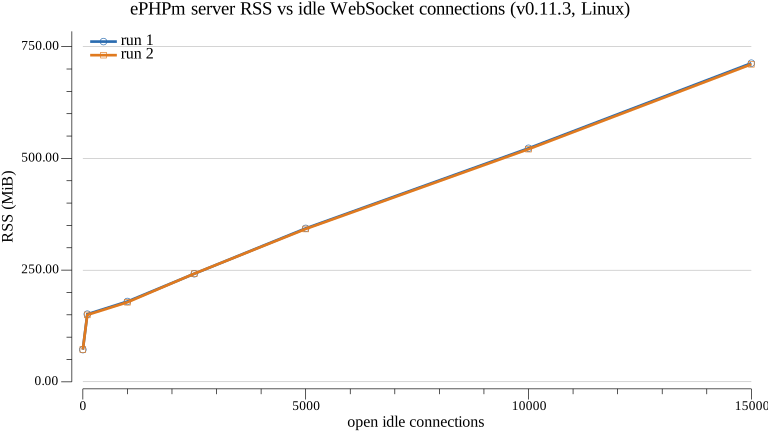
The jump from 72 MiB to 150 MiB at the first 100 connections isn’t the sockets. It’s the PHP thread pool waking up to
run their connect events. After that the growth is a straight line. From 1,000 to 15,000 connections, RSS
went from 180 to 713 MiB on run 1 and from 178 to 711 MiB on run 2. That’s 38 to 39 KB per idle connection in
userspace, with no PHP thread held. Opening 5,000 more connections, each running a PHP connect, took 0.7 s.
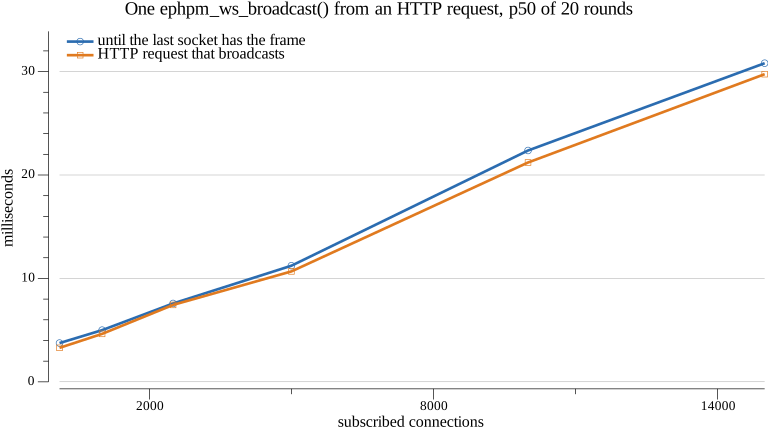
The fan-out is linear too. Here’s the median time until all subscribers had the frame:
- 5.0 ms at 1,000 connections
- 11 ms at 5,000
- 21 to 22 ms at 10,000
- 30 to 31 ms at 15,000
The worst of 20 rounds at 15,000 was 44 ms. Almost all of it is the ephpm_ws_broadcast() call itself. It enqueues
one frame per subscriber, at about 2 µs each, and delivery overlaps the loop. Everything ran on one machine over
loopback. Treat these as the server’s own cost, not what users on a real network will see.
The functional tests ran on Windows 11 with the Windows build of the same release. The TLS runs were on Linux. Everything in this post behaved the same on both, apart from the queue counts noted above and the slow-handler race.
Links
- Native WebSockets: ephpm #304, with follow-ups #318 (Windows FFI fix) and #310 (backpressure e2e coverage)
- Source:
crates/ephpm-server/src/websocket.rs,crates/ephpm-ws/src/registry.rs,crates/ephpm-e2e/tests/websockets.rs - ePHPm WebSockets guide
- ePHPm v0.11.3 release
- The design in brief
- RFC 6455