Zero-Dependency Deployments - Single Binary for WordPress
WordPress with no nginx, no php-fpm, no Redis and no MySQL. It runs from one ePHPm binary, a SQLite file and a distroless container image.
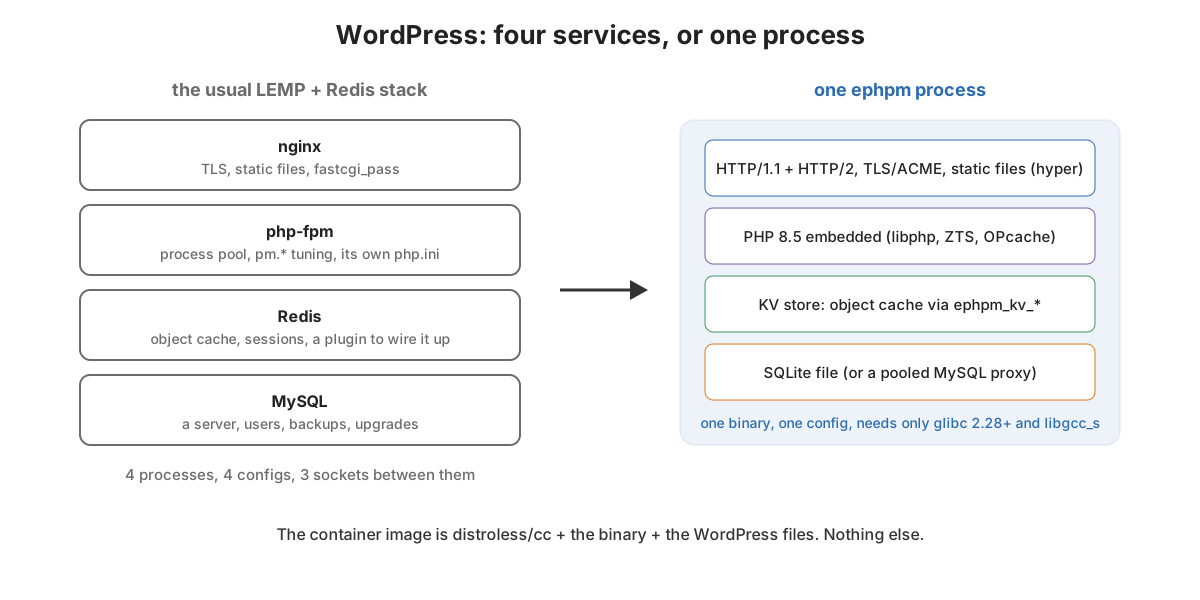
The standard way to run a WordPress site is four services:
- nginx for HTTP and TLS
- php-fpm to run PHP
- MySQL for data
- Redis, once the site gets slow enough that someone installs an object cache plugin
That’s four processes and four config files. There are three sockets between them and four things to upgrade. For a big site that’s fine. For a brochure site or a staging copy it’s absurd. The same goes for a PR preview, a box at the edge, or a CI job that needs a real WordPress to test a plugin against.
ePHPm is my attempt at making that one thing. This post walks through running stock WordPress from a single binary with no other services. Then it builds a container image that is just that binary and the site. Along the way it covers what’s inside the binary as of v0.8.2.
What’s in the binary
The Linux x86_64 build with PHP 8.5.7 is about 132 MB. That one ephpm executable carries:
- An HTTP server: hyper with HTTP/1.1 and HTTP/2, rustls TLS with ACME certificates, static files with ETags and compression, virtual hosts.
- PHP itself:
libphpstatically linked and ZTS, with OPcache and the usual extensions compiled in. Those aremysqli,pdo_mysql,pdo_sqlite,gd,intl,mbstring,curl,zipand friends. The same binary is also a PHP CLI:ephpm php -v. - A KV store that PHP can call directly through native functions. That’s what the WordPress object cache uses.
- A database layer: either a pooling proxy in front of a real MySQL, or no database server at all.
“Zero dependency” needs one footnote. The Linux release is dynamically linked against glibc, not a static musl binary:
$ ldd ephpm
	linux-vdso.so.1
	libdl.so.2 => /usr/lib/x86_64-linux-gnu/libdl.so.2
	libm.so.6 => /usr/lib/x86_64-linux-gnu/libm.so.6
	libpthread.so.0 => /usr/lib/x86_64-linux-gnu/libpthread.so.0
	librt.so.1 => /usr/lib/x86_64-linux-gnu/librt.so.1
	libgcc_s.so.1 => /usr/lib/x86_64-linux-gnu/libgcc_s.so.1
	libutil.so.1 => /usr/lib/x86_64-linux-gnu/libutil.so.1
	libc.so.6 => /usr/lib/x86_64-linux-gnu/libc.so.6
	/lib64/ld-linux-x86-64.so.2

$ objdump -T ephpm | grep -o 'GLIBC_[0-9.]*' | sort -uV | tail -1
GLIBC_2.28
Everything above is glibc’s own family plus libgcc_s. Release builds happen in an AlmaLinux 8 container, so the
newest symbol version it needs is 2.28. That means it runs on basically any Linux from 2018 onward. I went glibc over
musl on purpose. Native middleware modules are loaded with dlopen, and a fully static musl binary can’t do that.
How the binary gets built
Building PHP is the slow, fragile part of all of this. So it’s done once per PHP version, not once per ePHPm build.
static-php-cli compiles libphp with the embed SAPI and its library
dependencies into static archives. ephpm/php-sdk publishes those as release assets
per OS, architecture and PHP version. ePHPm’s build is a cargo xtask:
cargo xtask release 8.5 # resolve 8.5 -> pinned 8.5.7, download the SDK, build with PHP linked
xtask release does four things:
- resolves the PHP minor to a pinned patch version
- downloads and unpacks the matching SDK
- points
PHP_SDK_PATHat it - runs the cargo build with the shipped feature set
build.rs compiles the C SAPI wrapper and emits the link flags for libphp.a. A plain cargo build without an SDK
builds a stub that answers every PHP request with a “PHP not linked” page. That way the Rust side can be developed and
tested without PHP at all.
It’s not a cross-compiler. Each platform’s release is built on that platform, for PHP 8.3, 8.4 and 8.5. Linux x86_64 and aarch64 build in the AlmaLinux container. macOS arm64 and Windows x86_64 build natively.
WordPress with nothing else
Here’s the whole setup. Grab WordPress and the official SQLite Database Integration drop-in. That drop-in is WordPress’s own project for running on SQLite. Then add the ephpm/cache-wordpress object cache:
curl -sSL https://wordpress.org/wordpress-7.1.tar.gz | tar xz

# SQLite instead of MySQL
curl -sSLO https://downloads.wordpress.org/plugin/sqlite-database-integration.3.0.1.zip
unzip -q sqlite-database-integration.3.0.1.zip -d wordpress/wp-content/plugins/
cp wordpress/wp-content/plugins/sqlite-database-integration/db.copy wordpress/wp-content/db.php
mkdir -p wordpress/wp-content/database

# Persistent object cache backed by ePHPm's in-process KV store
git clone https://github.com/ephpm/cache-wordpress wordpress/wp-content/cache-wordpress
printf "<?php\nrequire __DIR__ . '/cache-wordpress/dropin/object-cache.php';\n" \
  > wordpress/wp-content/object-cache.php
Copy wp-config-sample.php to wp-config.php. Leave the DB credentials as placeholders, since the SQLite drop-in
ignores them. Add define( 'WP_CACHE', true ); and start it:
ephpm dev --port 8088 --document-root "$(pwd)/wordpress"
That’s a working WordPress on http://127.0.0.1:8088, with the installer, admin, themes and plugins. The database is
a file at wp-content/database/.ht.sqlite. The object cache lives in the same process as PHP. wp_cache_get() goes
straight from the Zend engine into the KV store through ephpm_kv_* native functions. There’s no socket and no Redis.
The container is the binary and the site
Since there’s nothing else to run, the image doesn’t need a distro. gcr.io/distroless/cc-debian12 is glibc, libssl,
CA certificates, tzdata and libgcc. It has no shell and no package manager. That covers exactly what the ldd
output above asks for:
# The whole runtime: glibc + libgcc from distroless, one binary, the site.
FROM gcr.io/distroless/cc-debian12:nonroot
COPY --chmod=755 ephpm /usr/local/bin/ephpm
COPY ephpm.toml /etc/ephpm/ephpm.toml
COPY --chown=65532:65532 wordpress/ /srv/www/
EXPOSE 8080
ENTRYPOINT ["/usr/local/bin/ephpm", "serve", "--config", "/etc/ephpm/ephpm.toml"]
with a config that’s about as small as configs get:
[server]
listen = "0.0.0.0:8080"
document_root = "/srv/www"

[kv]
memory_limit = "64MB"
I built that with v0.8.2 (PHP 8.5.7), WordPress 7.1, SQLite Database Integration 3.0.1 and cache-wordpress. Then I ran
it and installed WordPress by posting the installer form with curl:
$ podman images
localhost/blog-wp-zerodep:latest       271 MB
gcr.io/distroless/cc-debian12:nonroot  25.1 MB

$ podman history --format '{{.Size}} {{.CreatedBy}}' localhost/blog-wp-zerodep | head -5
0B      ENTRYPOINT ["/usr/local/bin/ephpm", ...
0B      EXPOSE 8080
114MB   COPY dir:...          # WordPress 7.1 + plugins
3.07kB  COPY file:...         # ephpm.toml
132MB   COPY file:...         # ephpm

install step2: 200
<h1>Success!</h1>
After that the front page served normally. I wanted to confirm the pieces were really the ones I thought. So I dropped
a five-line check.php into the docroot that loads WordPress and prints what it’s running on:
persistent object cache: yes
cache class: Ephpm\Cache\WordPress\ObjectCache
db driver: WP_SQLite_DB
sapi: ephpm
After the install and a handful of page views, podman stats had the container at about 76 MB of memory. The whole
database was one small SQLite file. Out of 271 MB of image, about half is the WordPress tree and half is the binary.
Distroless itself is 25 MB. There’s no shell in the container at all. That’s nice for security and occasionally
annoying for debugging. The binary is also a PHP CLI, so podman exec ... /usr/local/bin/ephpm php -r '...' is the
escape hatch.
Where this is the right tool, and where it isn’t
Where one binary with a SQLite file makes sense:
- CI: testing a plugin or theme against a real WordPress without starting MySQL and a web server in the job.
- PR previews and staging copies, where spinning up and tearing down is the main workload.
- Edge and small boxes: a Raspberry Pi, a $5 VM, an appliance. Any box where the LEMP stack is most of the resource budget.
- Low-traffic sites whose real requirement is “it stays up and I don’t have to babysit it.”
Where it isn’t:
- Write-heavy, multi-writer sites. SQLite is one writer at a time. A busy WooCommerce store with concurrent
checkouts wants a real MySQL. ePHPm still helps there. Point
[db.mysql]at the MySQL server and its proxy pools connections. You’ve still dropped nginx, php-fpm and Redis. - Plugins that assume MySQL-specific SQL in ways the SQLite drop-in can’t translate. WordPress’s SQLite project has come a long way, but test your plugin list before you commit.
- Setups that need the cache to survive a restart. The KV store is a cache. The object cache starts cold.
What’s next
The single binary is the easy part to show. The interesting work is behind it. One part is making the embedded engine behave like php-fpm for the apps that assume php-fpm. The other is making the database side do more than SQLite-in-a-file without bringing a server back. That’s where most of the ePHPm commits are going right now.
How I ran it
AMD Ryzen 9 5950X, Windows 11 with WSL2 and Podman 5 (rootful machine). I built the image from the files above with
podman build and ran it with -p 18300:8080. The installer was posted from the Ubuntu WSL distro with curl. The
three GET / timings are the first three requests after install from a cold OPcache, not a benchmark.