Building k9s for Linode With Bubble Tea
A k9s-style terminal app for managing Linode. Search for any resource, browse it, and jump straight into k9s, a database shell or SSH.
A lot of my day is spent in k9s. Sometimes I need something from the Linode side of the house. Maybe it’s a
node that won’t boot, a volume nobody cleaned up or the kubeconfig for a cluster I just made. Then I’m back in a browser tab or typing
linode-cli incantations. I wanted the k9s workflow for the Linode API itself:
:to jump to a resource type/to filter- single-key actions on the selected row
- Enter to go deeper
That turned into linode-tui. It’s a Go TUI built on Bubble Tea, linodego and urfave/cli v3.
It started as a private repo in May. In June it got restructured for open source. I flattened internal/, slimmed the CLI down and
moved to linodego v2. It went public with v0.1.0 at the end of August. Everything here is as of
v0.2.1.
One list view, thirteen resources
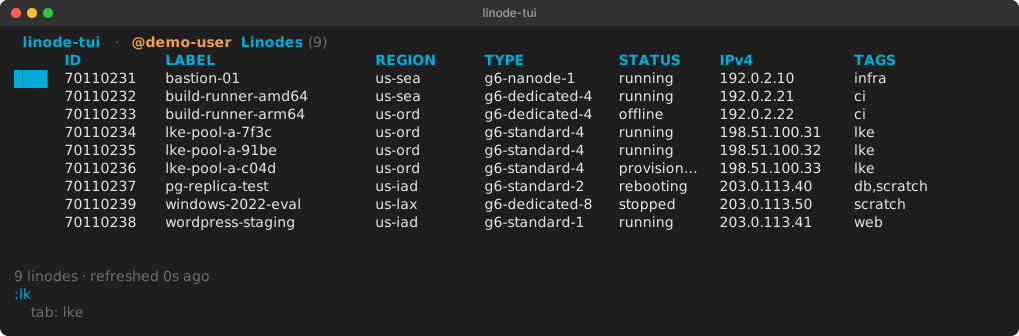
There are 13 resource views: Linodes, Volumes, NodeBalancers, Firewalls, Images, Domains, LKE clusters, VPCs, Placement Groups,
StackScripts, Object Storage, databases and Events. Writing 13 Bubble Tea models by hand would have been a lot of copy and paste. So
there’s one generic listView[T], and every resource is a set of options handed to it. This is most of the Linodes view:
func init() {
	Register("instances", []string{"linodes", "inst", "li"}, newInstances)
}

func newInstances(d Deps) View {
	return newListView(listOpts[linodego.Instance]{
		Deps:  d,
		Title: "Linodes",
		Columns: []Col{
			{Title: "ID", Width: 10, MinWidth: 6, Priority: PriPinned},
			{Title: "LABEL", Width: 28, MinWidth: 12, Priority: PriPinned, Flex: true},
			{Title: "REGION", Width: 14, MinWidth: 8, Priority: PriMed},
			{Title: "TYPE", Width: 18, MinWidth: 10, Priority: PriMed},
			{Title: "STATUS", Width: 12, MinWidth: 8, Priority: PriHigh},
			{Title: "IPv4", Width: 16, MinWidth: 12, Priority: PriLow},
			{Title: "TAGS", Width: 24, MinWidth: 8, Priority: PriLowest},
		},
		Lister: func(ctx context.Context, c *linode.Client) ([]linodego.Instance, error) {
			return c.Raw().ListInstances(ctx, nil)
		},
		// Rower, Matcher, Sort, Actions, KeyHandlers ...
	})
}
The list view owns polling, filtering, selection, bookmarks, the confirm modal and the status line. A view supplies four things:
- a lister
- a function that turns one item into a table row
- a matcher for
/ - its actions
Reboot, for example, is just a key, a label, a prompt and a Run that calls linodego:
{
	Key:    "R",
	Label:  "reboot",
	Prompt: func(it linodego.Instance) string { return fmt.Sprintf("Reboot %s (id %d)?", it.Label, it.ID) },
	Run: func(ctx context.Context, c *linode.Client, it linodego.Instance) error {
		return c.Raw().RebootInstance(ctx, it.ID, linodego.InstanceRebootOptions{})
	},
},
Register puts the view in a registry with its aliases. The command bar resolves against that registry. Exact names and aliases win,
then prefix matches. That’s why :lk in the screenshot above offers lke on Tab. Some drill-in views only make sense with a parent,
like a NodeBalancer’s configs or a Domain’s records. Those register with RegisterChild so they never show up as top-level verbs.
Drill-ins: hand the terminal to the real tool
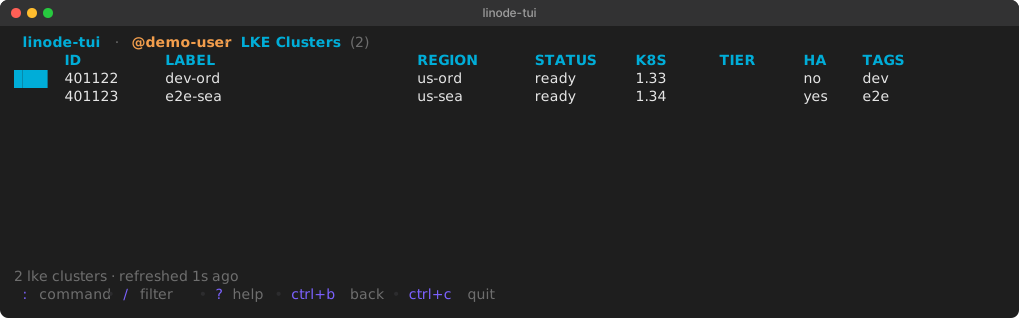
I didn’t want to rebuild k9s inside linode-tui. Press c on an LKE cluster and it fetches the kubeconfig from the API. It writes it to
a 0600 temp file and runs k9s against it. For DBaaS it builds a connection URL and runs
lazysql. On a Linode, c is ssh root@<ip>. C is
lish through Linode’s bastion. That works
even when the box has no public IP.
Bubble Tea has exactly the primitive for this. tea.ExecProcess releases the terminal and runs the child process attached to it. It
resumes the TUI when the child exits:
case config.ModeTUI, "":
	c := exec.CommandContext(ctx, bin, args...)
	c.Stdin = os.Stdin
	c.Stdout = os.Stdout
	c.Stderr = os.Stderr
	prepare(c)
	return tea.ExecProcess(c, func(err error) tea.Msg { return ExitMsg{Kind: kind, Err: err} }), nil
Every tool is configurable (tools.kubernetes.exec, tools.mysql.exec and so on). You can point it at Lens or MySQL Workbench with
mode: gui and it launches detached instead. If k9s or lazysql isn’t installed, linode-tui offers to download a pinned release. It
verifies the checksum and puts the binary in an install dir you pick on first run.
The kubeconfig temp file was also the subject of the first bug report from somebody other than me
(#2). c from the LKE list worked. But c from the cluster’s detail page
launched k9s, which immediately died with Watcher failed for contexts -- stat .... The detail view was cleaning up the kubeconfig like
this:
return tea.Sequence(exec, func() tea.Msg {
    if cleanup != nil { cleanup() }   // runs immediately
    return lkeDetailDrillDoneMsg{}
})
tea.Sequence runs the commands in order. But ExecProcess’s command isn’t blocking. It just returns a message asking the program to
run the process. So the cleanup closure ran as soon as that message was handed back. The file was gone before k9s had even started.
The list view didn’t have the bug. Its closure only returned a done message. It ran the cleanup when that message came back through
Update, which happens after k9s exits. #3 moved the detail view to the same
pattern. #16 collapsed both paths into one shared function so it can’t drift
again:
func RunDrillIn(deps Deps, msg DrillInMsg, done func(cleanup func()) tea.Msg) (tea.Cmd, error) {
	runner := tools.New(deps.Cfg)
	exec, err := runner.RunWithEnv(context.Background(), msg.Tool, msg.Vars, msg.Env)
	if err != nil {
		if missing, ok := tools.IsToolMissing(err); ok {
			return func() tea.Msg { return InstallNeededMsg{Kind: missing.Kind, Drill: msg} }, nil
		}
		if msg.Cleanup != nil {
			msg.Cleanup()
		}
		return nil, err
	}
	cleanup := msg.Cleanup
	return tea.Sequence(exec, func() tea.Msg { return done(cleanup) }), nil
}
If you write Bubble Tea apps that shell out, that one is worth remembering.
Hardening for release
This tool holds API tokens. It has a :clear-account command that deletes everything in an account. That deserves a hard look before
other people run it. Most of what went into v0.2.0 was that pass, done as a handful of large PRs.
Config persistence (#12). This was the worst one. A --token flag or
LINODE_TOKEN got stored in memory as a synthetic __cli__ account. Then the first incidental Save() wrote your environment token
into config.yaml in plain text. Starring a row or installing a tool was enough to trigger it. Save now marshals a scrubbed copy. It
also stopped truncating the file in place, because a crash between truncate and write lost every account:
// Write-then-rename: os.WriteFile truncates in place, so a crash (or a
// full disk) between truncate and write left every account and token
// gone. Rename is atomic on POSIX and on Windows (MoveFileEx).
tmp := c.path + ".tmp"
if err := os.WriteFile(tmp, data, 0o600); err != nil {
	return err
}
if err := os.Rename(tmp, c.path); err != nil {
	_ = os.Remove(tmp)
	return err
}
Saves are behind a mutex, since background tool installs save from goroutines. The config dir went from 0755 to 0700. refresh: 1ms
gets clamped to 1s instead of becoming a self-inflicted 429 generator. The same PR fixed :clear-account, which only guarded on the
name of the local account. accounts: {dev: {token: <prod token>}} is one bad paste away. So it now resolves /profile and refuses
to delete anything if the token belongs to a different user than the one you confirmed. It also deletes LKE clusters before instances
now. Otherwise the node pools recreate the workers you just deleted.
App state (#13). Opening a modal swallowed the list’s tick message. That
quietly ended the pane’s refresh loop for the rest of the session. Switching accounts rebuilt only the focused pane. Split panes kept
polling the old account with the old token. A bare :export panicked on args[1:] of an empty slice. A new test now dispatches every
command-bar verb and alias. It fails if any of them comes back as unknown command. That test is what found the :export panic.
Responsive columns (#16). The Linodes table wants about 140 cells. On a narrower
terminal the bubbles table wrapped every row into garbage. Columns now carry a width, a minimum and a priority. The list drops the
lowest-priority column until the minimums fit. Then it spends the leftover space growing the survivors and the Flex column. ID and
LABEL are pinned and never dropped. The status line tells you »3 cols hidden — widen terminal.
The yaml tag (#23). #13 made audit_retention_days: 0 mean “keep forever”,
like the docs always said. Then the review caught that the field still had omitempty. An explicit 0 got dropped on save, and the
next load re-seeded the 90-day default. Users who opted out of pruning would have been opted back in by any unrelated save. The fix was
deleting ,omitempty and adding a Save→Load round-trip test. omitempty on an int where zero means something is a bug that’s easy to
write.
Tokens
The config doesn’t have to hold a token. A literal token: works but isn’t recommended. Accounts can point at a 1Password reference.
linode-tui shells out to op to resolve it:
default_account: dev
accounts:
  dev:
    op_ref: "op://Private/linode-dev/token"
  e2e:
    op_ref: "op://Private/linode-test/token"
:account e2e switches live. There’s also an audit log of every mutating action (~/.cache/linode-tui/audit.log). That log is what
powers :undo and the ctrl+y replay.
How the screenshots were made
I didn’t want a real account in a blog post, so the screenshots run against a fake API. linodego honors LINODE_URL. I wrote a small
Go server that returns canned JSON for /v4/profile, /v4/linode/instances and /v4/lke/clusters, with IPs from the documentation
ranges. Then I ran linode-tui v0.2.1 in a 118x16 tmux pane with LINODE_URL=http://127.0.0.1:18080, a dummy token and an empty
HOME. The server log shows the polling doing what it should, a list refetch every 2 seconds:
GET /v4/linode/instances
GET /v4/profile
GET /v4/linode/instances
GET /v4/linode/instances
GET /v4/linode/instances
GET /v4/lke/clusters
GET /v4/lke/clusters
The images are tmux capture-pane -e output converted to SVG with the colors exactly as tmux reported them.
Install
go install github.com/luthermonson/linode-tui/cmd/linode-tui@latest
export LINODE_TOKEN=...
linode-tui
Or grab a binary from the releases page. GoReleaser builds Linux and macOS on amd64 and arm64, and Windows on amd64. If you already
live in linode-cli, the README has a five-line shell function. It routes linode tui to this and everything else to the real CLI. A
Homebrew tap is next on the list.