Five Ways to Not Firewall a Windows Container (and the One That Works)
Five different Windows firewall approaches failed to stop a container from reaching my home network. The sixth, a different network mode for the container, finally worked.
ephemerd runs CI jobs from pull requests. One of the rules is that a job can
reach the internet but not my LAN. On Linux that’s a few iptables rules in the FORWARD path, and I didn’t think about it
much. On Windows I spent about a week finding out how many ways there are to write a firewall rule that Windows accepts,
lists and never applies.
The setup is Windows Server 2025 (build 26100) with job containers running under Hyper-V isolation. They sit on the default
HNS NAT network that every Windows container tutorial uses. In ephemerd’s case that’s 10.88.0.0/16 with gateway
10.88.0.1. The target is the same as Linux. Block 10.0.0.0/8, 172.16.0.0/12, 192.168.0.0/16 and 169.254.0.0/16,
and allow everything else.
How I knew it was broken
The repo has a containment suite, .github/workflows/containment.yml. It was first drafted in
#134 and landed in consolidated form on August 15th. It’s a workflow that runs
inside a real job on each platform and tries to reach things it shouldn’t. For Windows it probes the management planes on my
LAN: two Proxmox hosts, an Incus API and Grafana. Every attempt below was judged by this output from inside a live job
(addresses changed):
FAIL: reached Proxmox host A at 10.0.0.11:8006
FAIL: reached Proxmox host B at 10.0.0.12:8006
FAIL: reached Incus daemon   at 10.0.1.13:8443
FAIL: reached Grafana        at 10.0.2.45:3000
I saw those four lines a lot.
1. Host Windows Firewall, scoped to the container source
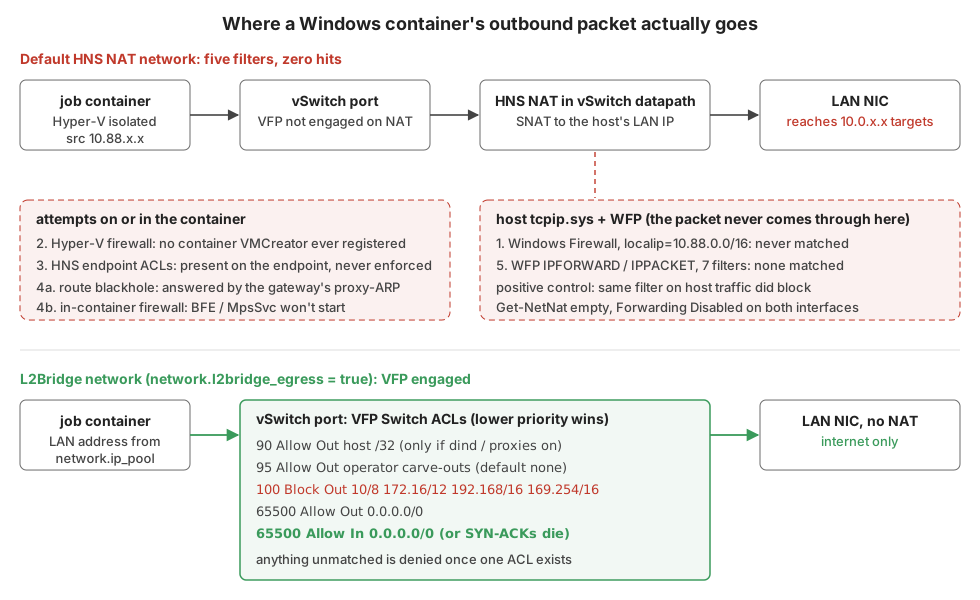
#136. The theory was that WinNAT routes and NATs container traffic through the host. So a host firewall rule should be in
the path. The rules were netsh advfirewall outbound blocks for the private ranges. They were scoped localip=10.88.0.0/16
so the host’s own LAN traffic could never match.
One wrinkle made the rule set interesting. Windows Firewall has no rule ordering. Block always beats Allow, so the Linux
pattern of “allow the gateway, then deny 10/8” can’t be ported. If 10.88.0.1 ends up inside a block range, DNS and NAT die
and no allow rule can rescue it. So the container subnet gets subtracted from each blocked range up front with a little CIDR
arithmetic:
for _, cidr := range egressBlockedCIDRs {
	remote, err := subtractCIDR(cidr, subnet)
	if err != nil {
		return nil, fmt.Errorf("computing blocked ranges for %s: %w", cidr, err)
	}
	rules = append(rules, winFirewallRule{
		name: firewallRulePrefix + "-block-" + strings.ReplaceAll(cidr, "/", "_"),
		spec: []string{
			"dir=out", "action=block", "protocol=any",
			"localip=" + subnet,
			"remoteip=" + strings.Join(remote, ","),
			"profile=any", "enable=yes",
		},
	})
}
10.0.0.0/8 becomes 10.0.0.0-10.87.255.255,10.89.0.0-10.255.255.255. Unit tested, idempotent, very tidy. On the real node
it did nothing. The PR body had even flagged the source-IP assumption as unverified without hardware. That’s the assumption
that was wrong.
2. The Hyper-V firewall
#140. Server 2025 ships New-NetFirewallHyperVRule. It’s a firewall that filters at the VM’s vNIC before NAT, scoped by a
VMCreatorId. That’s Microsoft’s purpose-built answer for exactly this problem, and it’s what WSL uses. There’s no
documented creator GUID for Windows containers. So ephemerd discovered it at runtime with Get-NetFirewallHyperVVMCreator,
skipping WSL’s well-known one.
On metal, Get-NetFirewallHyperVVMCreator and Get-NetFirewallHyperVPort both came back empty, even with a live container
running. There’s no creator to scope a rule to, so the rules never attach to anything.
3. HNS endpoint ACLs
These were in the code from the start: HNS ACL policies with RuleType: Switch on each container’s endpoint. While a
containment run was held open I pulled the live endpoint. The rules were right there:
[{"Action":"Block","Direction":"Out","Priority":100,"Protocols":"6,17",
  "RemoteAddresses":"10.0.0.0/8","RuleType":"Switch","Type":"ACL"}, ...]
Present, correct and inert. vfpctrl /list-vmswitch-port would enumerate the ports, but every port-scoped operation failed:
vfpctrl /port <port> /get-port-state  -> ERROR (2) The system cannot find the file specified.
vfpctrl /port <port> /list-layer      -> exit 1
vfpctrl /list-nat-range               -> ERROR (87) The parameter is incorrect.
VFP is the switch extension that actually enforces those ACLs. It isn’t managing the ports on a NAT network. The policy gets stored on the endpoint object and nothing ever reads it.
4. Route blackholes and a firewall inside the container
At this point I tried doing it from inside the container. I added a route for each private range pointing at a dead on-link
next hop. It installed fine, but the planes were still reachable because the NAT gateway answers ARP for everything
(proxy-ARP). Routing to 127.0.0.1 instead got The route addition failed: The parameter is incorrect.
The in-container Windows Firewall was a non-starter. Get-NetFirewallProfile returned system error 1753, and
Start-Service BFE returned “Cannot start service”. There’s no Base Filtering Engine running inside a Server Core container.
That’s when I wrote it up as a negative result in #142, which was closed without merging. The write-up did three things:
- It dropped the code’s “refusing to start unfirewalled” claim in favour of a warning that Windows egress isn’t enforced on this host class.
- It recommended putting the Windows runner on a VLAN whose router drops RFC1918.
- It noted the one software avenue left.
The warning itself shipped with the L2Bridge work below.
5. Raw WFP at the forwarding layer
On Linux the container rules live in FORWARD. The Windows Filtering Platform has a direct analogue:
FWPM_LAYER_IPFORWARD_V4. A plain block filter there needs no callout driver and no kernel signing. Tailscale’s pure-Go
wf package made it easy to try from a small spike binary:
s.AddRule(&wf.Rule{
	ID: ruleID, Name: "ephemerd-spike-block", Layer: wf.LayerIPForwardV4,
	Sublayer: subID, Provider: provID, Weight: 1000, Action: wf.ActionBlock,
	Persistent: true,
	Conditions: []*wf.Match{
		{Field: wf.FieldIPDestinationAddress, Op: wf.MatchTypeEqual, Value: netip.MustParsePrefix("10.0.2.45/32")},
		{Field: wf.FieldIPLocalInterface, Op: wf.MatchTypeEqual, Value: luid(9)}, // the NAT vSwitch vNIC
	},
})
First lesson: enumerate the fields of the layer on the build you’re actually running. On this one, IPFORWARD_V4 has no
IP_ARRIVAL_INTERFACE. The arrival interface is IP_LOCAL_INTERFACE and the destination is IP_DESTINATION_ADDRESS. Both
conditions in my plan had to be remapped before any result meant anything.
I targeted Grafana only, since blocking it can’t cut the runner off from GitHub. A working filter would have dropped one
FAIL line and kept the other three. Results:
| Layer | Conditions | Grafana |
|---|---|---|
IPFORWARD_V4 |
dest + arrival interface | reached |
IPFORWARD_V4 |
dest only | reached |
INBOUND_IPPACKET_V4 |
dest + arrival interface | reached |
| 7 filters at once across inbound, forward and post-NAT outbound | every combination | reached |
The one that convinced me was the post-NAT OUTBOUND_IPPACKET_V4 filter on destination alone. After NAT the packet has to
leave the host’s LAN NIC addressed to Grafana. That filter didn’t see it either.
When a filter matches nothing you have to rule out “my filter is broken”. So I ran a positive control. It used the same
layer and field, pointed at the host’s own traffic to 1.1.1.1.
ALE_AUTH_CONNECT_V4  block IP_REMOTE_ADDRESS=1.1.1.1 -> host->1.1.1.1:443 reachable=False
OUTBOUND_IPPACKET_V4 block IP_REMOTE_ADDRESS=1.1.1.1 -> host->1.1.1.1:443 reachable=False
(after provider removed)                             -> host->1.1.1.1 restored=True
So WFP works and the method was right. The container’s packets just never pass through the host’s tcpip.sys at all. Two
more facts point the same way. Get-NetNat is empty, since the HNS NAT isn’t a NetNat object. And IP forwarding is
Disabled on both the vSwitch vNIC and the LAN NIC. The NAT happens inside the Hyper-V switch datapath, beside the host
stack rather than through it. All of this went into an investigation doc in the repo with a reproducer, so nobody starts
attempt six from scratch. That’s docs/arch/windows-egress-wfp-investigation.md, in PR #143.
What worked: L2Bridge and VFP
Attempt 3 had the right enforcement point (the vSwitch port) on the wrong network type. On an HNS L2Bridge network, VFP
is engaged and the same RuleType: Switch ACLs are enforced. The container stops being NAT’d. It becomes a peer on the
host’s LAN with its own address. That’s #144, opt-in behind network.l2bridge_egress.
The non-obvious part is that VFP goes default-deny the moment any ACL exists on a port. A port with only block rules blocks everything, internet included. So the rules are a ladder, and the lower priority number wins:
| Priority | Action | Dir | Remote | Why |
|---|---|---|---|---|
| 90 | Allow | Out | this host /32 |
only when dind or the module proxy is on |
| 95 | Allow | Out | operator carve-outs | empty by default |
| 100 | Block | Out | 10/8, 172.16/12, 192.168/16, 169.254/16 | the actual policy |
| 65500 | Allow | Out | 0.0.0.0/0 | the internet |
| 65500 | Allow | In | 0.0.0.0/0 | TCP return traffic |
That last row is the one nobody tells you about. Without an inbound allow-any, outbound SYNs leave just fine. Then every connection dies when the SYN-ACK comes back. That includes destinations the ladder explicitly allows. From the code:
// Tier: allow-any Out AND In (lowest precedence). BOTH are mandatory:
// without them the port default-denies everything (internet included), and
// the INBOUND allow is required or TCP return traffic (SYN-ACK) is dropped
// and even permitted destinations fail.
for _, dir := range []hcn.DirectionType{hcn.DirectionTypeOut, hcn.DirectionTypeIn} {
	if err := add(hcn.AclPolicySetting{
		Protocols:       aclAnyProtocol,
		Action:          hcn.ActionTypeAllow,
		Direction:       dir,
		RemoteAddresses: "0.0.0.0/0",
		RuleType:        hcn.RuleTypeSwitch,
		Priority:        aclPriorityAllowAny,
	}); err != nil {
		return nil, err
	}
}
The blocks are whole supernets, with no carve-out for the container’s own subnet or gateway. On L2Bridge the container subnet is the management LAN. An “except my own subnet” exception would exempt exactly the hosts I’m trying to protect. Containers still route through the gateway as a next hop. They just can’t address it. I verified it from inside a container:
- Blocked: Grafana, Incus, both Proxmox hosts, the router’s web UI and the ephemerd host.
- Fine:
1.1.1.1:443,8.8.8.8:53, DNS andhttps://example.com.
Things that bit me on the way:
-
Port-scoped ACLs blackhole the whole port. An early ladder had UDP 67/68 allows for DHCP, with ports and no address scope. HNS returned success and then nothing egressed at all. Every rule is now address-scoped. A test fails the build if anyone adds a port scope back.
-
HNS won’t do DHCP for you. Without a declared subnet, HNS refuses to create the network (
0x803b0005). With one, it hands out addresses from it on its own. On a real LAN that means colliding with your DHCP server. Sonetwork.ip_poolis required, with no default, and ephemerd does the allocation:[network] l2bridge_egress = true host_nic = "Ethernet" ip_pool = "192.0.2.200-192.0.2.230" # a range your DHCP server never leases -
Things were bound to
10.88.0.1. The per-job Docker API listener and the Go module proxy bound to the NAT gateway address. That address doesn’t exist on L2Bridge, so every job failed to provision. They now bind the host’s adapter address. The/32allow at priority 90 lets containers reach it. -
That
/32opens every port on the host. It can’t be port-scoped (see above). So port precision moved to the host’s own firewall. That works here because without NAT the container’s real address is on the packet. A pen test from inside a job then reached the host’s WinRM (5985) and RPC endpoint mapper (135). A stock Windows host allows those from the LAN, and the container is now a LAN peer.da802c9adds inbound blocks for 135, 139, 445, 3389, 5985, 5986 and 47001 scoped to the pool. #158 extended them to UDP plus the name-resolution ports. -
Switching needs a reboot. Creating an L2Bridge network next to a live NAT network wedged HNS on my test node. It was bad enough that recovery took a hard reset from Proxmox. Cordon, drain, reboot, then start ephemerd.
L2Bridge isn’t a perfect sandbox either. A container on the LAN segment can see broadcast and multicast from its peers. There’s also no anti-spoof policy I could apply with confidence yet. The security guide says to pair it with a VLAN, and I’d still do that.
What I took away from it
The common thread in all five failures is that Windows accepted the configuration every time. netsh added the rule.
ApplyPolicy returned success. The ACL showed up on the endpoint. WFP listed seven installed filters. None of that tells
you the packet passes through the thing you configured. The only test that meant anything was a probe from inside a real
job. When it said “reached”, a positive control told me whether the filter or the path was wrong. That control used traffic
I knew went through the engine.
Links
- ephemerd (PRs #136, #140, #142, #143 and #144 carry the full evidence)
- ephemerd security guide
- tailscale/wf
- Windows container networking: network drivers