ephemerd: One Daemon, a Fresh Runner Per Job, Every OS
A single Go binary that runs self-hosted GitHub Actions runners on Linux, Windows and macOS, with a new container or VM for every job.
I have CI that needs Linux amd64, Linux arm64, Windows and macOS. GitHub-hosted runners for all four get expensive fast,
especially the arm64 and Mac minutes. Self-hosted runners fix the bill and create a different problem. A stock
actions/runner on a box you own runs whatever the workflow says. It keeps whatever the last job left behind. And it’s
one fork PR away from somebody running code on your LAN.
The usual answers didn’t fit. ARC wants a Kubernetes cluster, and realistically Linux nodes. Windows only works in its legacy mode if you bring Windows Kubernetes nodes and build your own runner image. macOS isn’t on the table. The Firecracker-based runners are Linux only. I wanted one thing I could install on every box in the rack, Windows and Mac included. It should give each job a brand new environment and throw it away afterwards. That turned into ephemerd. I’ve been building it since April and it now runs all of my CI.
What it is
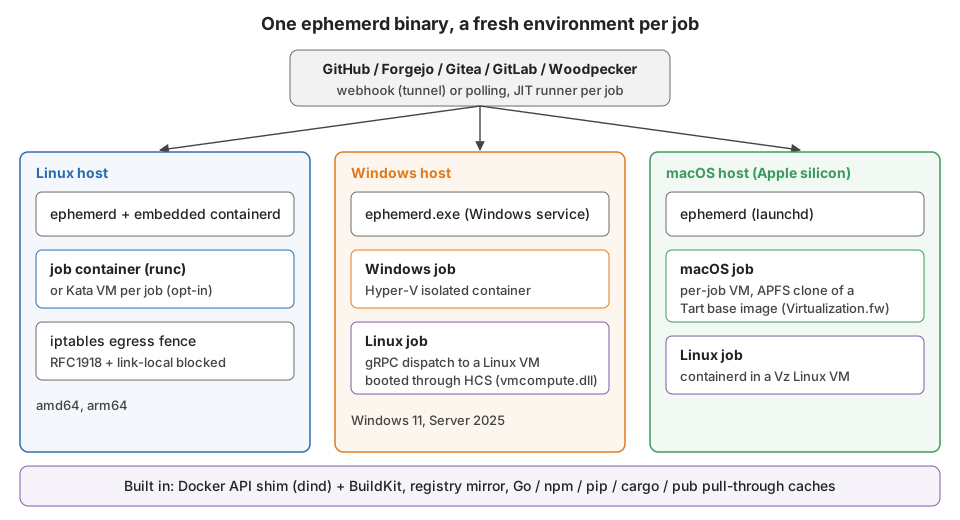
ephemerd is a single Go binary (MIT licensed) that runs as a system service. It watches your forge for queued jobs. It either polls the API every 30 seconds or receives webhooks. For each job it:
- asks GitHub for a just-in-time runner config, good for exactly one job
- creates a fresh container or VM for that job
- starts the embedded Actions runner inside it with the JIT config
- destroys the whole environment when the job completes
There’s no runner pool sitting around between jobs. Nothing carries over from one job to the next. GitHub is the main provider, and there are providers for Forgejo, Gitea, GitLab and Woodpecker too.
The part I’m happiest with is that it embeds containerd as a Go library. It doesn’t talk to a containerd you installed. If you’ve used k3s or RKE2 that pattern will look familiar. After my years at Rancher it was the obvious way to go. It means one binary, one version of containerd, and no “which containerd is on this host” support questions.
Linux: containerd and runc
On Linux the job is an OCI container on the host, created through the embedded containerd with runc. This is the fast path. It takes a couple hundred milliseconds to get a job container up. The runner image is a normal OCI image, so the same Dockerfile builds the job environment for every Linux host.
Since v0.2.2 there’s also an opt-in Kata Containers runtime. It gives each job its own kernel in a lightweight VM:
[runner.linux]
runtime = "kata"   # default is "runc"
It’s not the default because it isn’t free. I measured it before merging. The file I/O cost is a lot bigger than the
boot cost, which is a story for its own post. If you set kata and the shim or /dev/kvm is missing, ephemerd refuses
to start. It won’t quietly run your jobs on runc.
Windows: Hyper-V isolated containers, plus a Linux VM
On a Windows host, Windows jobs run in Hyper-V isolated containers. Every job gets its own utility VM and kernel. That’s the isolation level I want for untrusted code on Windows.
Linux jobs on the same Windows box go to a Linux VM that ephemerd boots itself. It started out on WSL2, which can’t run
under LocalSystem. So ephemerd now boots an Alpine kernel directly through the Host Compute Service API. I wrote that
up in Escaping WSL: Booting My Own Linux VM Through Hyper-V’s HCS API. The
Windows daemon keeps the GitHub credentials and the scheduler. It sends container lifecycle calls to the ephemerd inside
the VM over gRPC.
macOS: a VM per job
On Apple silicon there are two kinds of jobs. macOS jobs get their own macOS VM through Virtualization.framework. That covers Xcode, Swift and anything else that needs a real macOS. The base disk comes from one of Cirrus Labs' Tart macOS images, pulled as an OCI artifact. Each job’s disk is an APFS clone of it. A clone is copy-on-write, so creating one is instant and costs no disk until the job writes something. When the job is done the clone is deleted.
Linux jobs on the Mac go to a long-lived Linux VM (also Virtualization.framework) running containerd. That’s the same model as the Windows host. The same Linux runner image works on all three.
The parts jobs actually notice
A lot of the work wasn’t about isolation at all. It was about making real workflows run unmodified inside it.
A Docker API. Half of all workflows run docker build or docker run somewhere. container: jobs need a Docker
daemon for the runner to drive. Rather than run Docker-in-Docker, ephemerd serves a Docker-compatible API per job and
points the job at it. It’s backed by containerd in a per-job namespace, with BuildKit embedded for docker build.
Sibling containers a job starts are torn down with the job.
Pull-through caches. Every job starting from nothing means every job downloads the world. ephemerd runs
pull-through caches for Go modules, npm, pip, cargo and pub. It injects the right environment variables (GOPROXY and
friends) into the job. Container pulls can be routed through a registry mirror on your LAN. The motivation is in the
registry mirror’s own package docs. One Linux node pulled 294 GB in 4.1 days. The single biggest contributor was one
1.1 GB CI image pulled 163 times in a week.
An egress fence. A job container can reach the internet and nothing on the private ranges. 10.0.0.0/8,
172.16.0.0/12, 192.168.0.0/16 and 169.254.0.0/16 are blocked. On Linux that’s iptables. On Windows it turned out
to be a long fight. Since v0.2.0 the working answer is an opt-in L2Bridge network with VFP ACLs.
Getting started
Installation is the same command on all three platforms. It registers the right kind of service (systemd, launchd or the Windows SCM):
ephemerd install
ephemerd start
ephemerd status
The minimum config is the owner you want runners for, plus credentials. That’s a token in the environment or GitHub App credentials in the config:
[github]
owner = "your-org"
# repos = ["repo1", "repo2"]   # omit for org-level runners
And from a workflow it looks like any other self-hosted runner:
jobs:
  build:
    runs-on: [self-hosted, linux, x64]
    steps:
      - uses: actions/checkout@v4
      - run: echo "Running on ephemerd"
If you’d rather not expose anything to the internet, the default polling mode needs no inbound ports at all. For instant dispatch it can run a Cloudflare tunnel, ngrok or localtunnel as a managed subprocess. It registers the webhooks itself.
Where it’s at
It’s at v0.2.3 as I write this, and it runs my whole fleet:
- Linux amd64 and arm64 nodes
- a Windows Server 2025 node
- a Mac mini
The repo has a containment test suite that runs from inside a real job and tries to reach things it shouldn’t. That has been the most useful thing in the project for finding out which of my assumptions were wrong.
There’s a Hugo docs site in the repo, and ephemerd doctor checks the host prerequisites for whatever platform it’s on.
There’s no Windows arm64 build yet. Next up is writing down some of the more painful lessons from the last few months,
starting with Windows networking.