Your Agent's Shell Allowlist Is Bypassable
A permission gate for AI agents' shell commands judged spellings instead of commands. I found several classes of bypass in shipmates' own gate, and one idea fixes most of them.
Every shipmates crew member runs shell commands. Before any of
them runs, it goes through a permission gate. The gate uses the same rule syntax as Claude Code settings:
Bash(git status), Bash(rm *), Write(**/.claude/settings.json). The rules are merged from several layers:
- a fleet-wide deny list pushed from Fleet Command
- per-persona policy files
- project settings
- the Brig, which compiles shipmates’ fifteen “Ship’s Articles” into deny and ask rules
Deny beats ask, ask beats allow.
That sounds solid until you remember the rule is matched against a string. The agent chooses the string. Between mid-August and mid-September I closed a long list of ways to say the same command so the gate didn’t recognize it. Some came out of a pre-release security review of shipmates (#34, #37, #42). Others came from an adversarial review of the fix for the previous batch. This post is about the classes. If you’re building a gate like this, they will apply to yours. Everything here is about shipmates’ own evaluator. All of it is fixed, and the examples use a placeholder URL.
The one idea
Every bypass below is the same mistake: the gate judged a spelling, not the command. A rule that names a command has to be matched against every command the line will run. That means every spelling the shell will accept. When the gate can’t see what will run, it has to fail closed to “ask”.
Class 1: trusting the first word
The gate has a list of read-only builtins (ls, cat, git status, grep…) that are allowed without a prompt.
That way crews aren’t asking permission to read files all day. The check looked at the first token and nothing else.
The compound splitter also didn’t treat a newline as a separator. So:
| command | head token | what actually runs |
|---|---|---|
cat notes > ~/.ssh/authorized_keys |
cat |
a file write |
echo ok⏎curl … -o ~/.bashrc |
echo |
a download over your shell profile |
echo $(curl … | sh) |
echo |
arbitrary execution |
env sh -c '…' |
env |
arbitrary execution |
find . -exec sh -c '…' \; |
find |
arbitrary execution |
PR #36 did three things:
SplitCompoundsplits on\n(while treating backslash-newline as the continuation it is).- The auto-allow requires a genuinely simple command. A quote-aware
hasShellControlscan rejects unquoted redirection,$(…), backticks, process substitution and leftover chaining. An unbalanced quote counts as control, because we can’t read the line the way the shell will. envandfindcame off the read-only list for good, with a comment saying why. Both run a program named in their own arguments.
Quoted metacharacters are still just arguments. grep 'a|b' file and echo "a > b" still auto-allow. There are tests
asserting that, because a gate that prompts on everything gets turned off.
Class 2: command lines hidden inside command lines
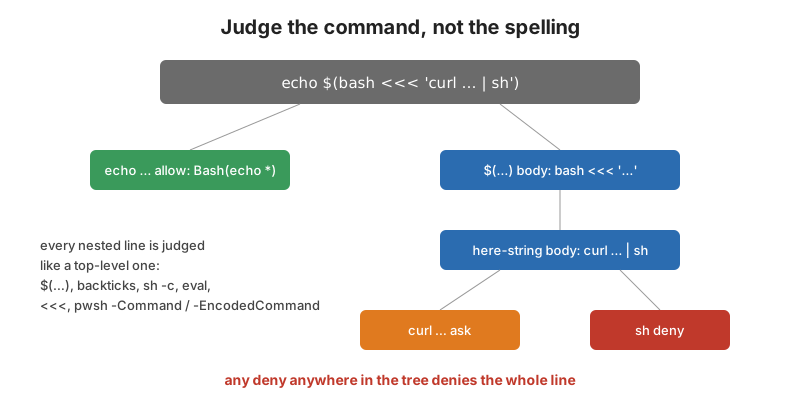
Not getting an auto-allow isn’t the same as being judged. An operator allow rule like Bash(echo *) still matched
echo $(curl … | sh) as a whole. The sh at the end of the pipe never met a rule. The same went for eval '…',
sh -c '…', bash <<< '…' and pwsh -Command …. Then there’s pwsh -EncodedCommand <base64>, a blob no glob can read
at all.
The fix (PR #43, d7b7262,
PR #55) was to extract every nested command line. Each one is judged
exactly like a top-level one:
func NestedCommandLines(sub string) []string {
	out := SubstitutionBodies(sub)
	out = append(out, shellScriptArgs(sub)...)
	out = append(out, hereStringArgs(sub)...)
	out = append(out, powerShellCommandArgs(sub)...)
	return append(out, evalArgs(sub)...)
}
and recurse, so the compound is allowed only if everything it will run is allowed:
for _, nested := range NestedCommandLines(sub) {
	nd := evaluateBashLine(tool, nested, rules, depth+1)
	if nd.Effect == EffectDeny {
		return Decision{Effect: EffectDeny, Reason: nd.Reason}
	}
	if nd.Effect == EffectAsk && worst == EffectAllow {
		worst = EffectAsk
	}
}
Each level is strictly shorter than its parent, so the walk ends on its own. maxNestedShellDepth = 8 is insurance.
A few details that mattered:
sh -cis not blanket-denied. Shell one-liners are ordinary work. Denying them would make the “no piped execution” Article mean “no shell scripting”. Instead the script gets split, and the inner bareshlands on the existing deny.- Here-strings are only treated as scripts when the head is a shell interpreter.
<<<fed togrepis data. - PowerShell resolves parameters by any unambiguous prefix. So
-Commandarrives as-c,-com…, and-EncodedCommandas-e,-enc, plus the documented-ec. It also accepts-Command:'…'. And an unquoted-Commandtakes the rest of the line as the script, not just the next token. An adversarial review of PR #55 found the colon form and the rest-of-line form both getting past my first version. -EncodedCommandis base64 of UTF-16LE. If it decodes, judge the script. If it doesn’t, hand back the raw blob. That matches no allow rule and no read-only builtin. It falls through to ask instead of riding in on thepwshhead token.
Class 3: respelling the program
Against a plain Bash(rm *) deny, all of these used to be an ask (or an allow, with a broad allow rule in force):
\rmcommand rmandcommand -p rmexec rmandexec -a ls rm/bin/rmFOO=bar rmtimeout 5s rm(5swasn’t recognized as the duration argument, so the “command” became5s)
On Windows, a backslash path to powershell.exe didn’t reduce to powershell. None of the PowerShell extraction even
ran.
normalizeHeadToken resolves those to the program that will run. The important design choice is that the normalized
form is an additional match candidate, never a replacement. It’s also only used for deny and ask. sudo and doas
fold too, but only for deny and ask. Folding them for allow would let a rule written for the unprivileged spelling
approve a privileged run. Widening what earns a silent allow is the one direction worth being stingy in. The cost of
leaving /bin/ls off the read-only list is a prompt.
Class 4: respelling the path
Path rules have the same problem with a different alphabet:
..segments:.claude/foo/../settings.jsonagainstWrite(**/.claude/settings.json). Paths are now lexically cleaned. Relative paths are resolved against the project root so../../../etc/cron.d/xlands on an absolute rule.- Case on Windows. NTFS folds case but the glob compared bytes. So
c:\windows\…missedC:/Windows/**. Matching now lower-cases both sides when the path is volume-rooted. It leaves Unix paths case-sensitive (/etcand/ETCare different files there). - UNC paths. The fold only fired for drive letters. So
\\srv\share\repo\.CLAUDE\settings.jsonon a network-share checkout dodged the rule (PR #59). The fun part of that one is thatpath.Cleancollapses the leading//to/. That erases the very signal the fold keys on. The cleaner has to notice and put it back. - Separator handling is deliberately asymmetric. A backslash is a separator only where it is one. So
.claude\foo\..\settings.jsoncleans on Windows and stays one strange filename on Linux.
Watching it close
To write this up I put a small probe test into a throwaway worktree. I ran it against five points in shipmates’ history. The rules are:
- allowed:
Bash(echo *),Bash(bash *)andBash(pwsh *) - denied:
Bash(sh),Bash(rm *)andBash(Remove-Item *) - denied for the path rows:
Write(**/.claude/settings.json)
The first row uses no rules at all, to show the read-only auto-allow on its own.
| command | Aug 15, before | after #36 | after #43 | after #55 | after #59 |
|---|---|---|---|---|---|
cat notes > ~/.ssh/authorized_keys (no rules) |
allow | ask | ask | ask | ask |
echo $(curl … | sh) |
allow | allow | deny | deny | deny |
eval 'curl … | sh' |
ask | ask | deny | deny | deny |
\rm -rf build |
ask | ask | deny | deny | deny |
timeout 5s rm -rf build |
ask | deny | deny | deny | deny |
bash <<< 'curl … | sh' |
allow | allow | allow | deny | deny |
pwsh -Command Remove-Item -Recurse C:/src |
allow | allow | allow | deny | deny |
pwsh -EncodedCommand <same, encoded> |
allow | allow | allow | deny | deny |
pwsh -EncodedCommand not-base64!! |
allow | allow | allow | ask | ask |
Write .claude/foo/../settings.json |
allow | allow | deny | deny | deny |
Write C:\repo\.CLAUDE\settings.json |
allow | allow | allow | deny | deny |
Write \\srv\share\repo\.CLAUDE\settings.json |
allow | allow | allow | allow | deny |
“Ask” rows in the first columns aren’t safe either. An ask means a human sees eval '…' in an approval prompt at the end
of a long day. They have to read it correctly. The point of a deny rule is that nobody has to.
The discipline
Every bypass got a test that fails first. Not “I wrote a test and it passes”. The loop was:
- write the case and watch it fail against
main - fix it and watch it pass
- for the review-driven ones, revert the fix in place and confirm the test goes red again
The four Windows bypasses in 96049fc were found after the
first version of PR #55 had green tests. That’s the whole argument for having someone (or something) attack your fix
specifically.
Equally important are the negative tests. ls, cat foo, git status, grep 'a|b' file and
pwsh -Command 'Get-ChildItem' all have to stay quiet. Otherwise the gate just becomes the thing people disable.
What’s still open
- Cross-interpreter nesting. A nested command line is judged under the outer tool’s name. A PowerShell payload
sent through the Bash tool is matched against
Bash(…)rules. APowerShell(iex …)deny wouldn’t fire. shipmates dispatches pwsh through the PowerShell tool on Windows. The commit that documents it notes it degrades to ask rather than allow. The right fix is to key nested evaluation off the interpreter. - Things the gate can’t see.
sh script.sh,pwsh -File x.ps1,< file, and arguments thatxargsreads from stdin all point at content that isn’t in the command string. These are documented blind spots.xargsstays a wrapper on purpose. Stripping it means… | xargs rm -rfgets judged asrm -rf. - Bypass mode. A persona running with
bypassPermissionsskips the ship-side layers by design. The question I had to answer early was whether that should also skip the Admiral’s fleet-wide deny list. It doesn’t. Article 14 makes the fleet deny bind bypass-mode personas. The Brig’s freeze still blocks Write-class tools even in bypass mode.
A shell allowlist matched against strings will never be a sandbox. It’s a seatbelt. It keeps an agent from doing the
obvious dangerous thing because it got confused or because a hostile issue body told it to. The walls are containment
(see Job Objects vs process groups) and running
the ship as an unprivileged user. But a seatbelt that comes undone when you spell rm with a backslash isn’t doing its
job either.
How I measured
The table comes from a probe test. It uses NewEvaluatorWithRules plus the package’s own rules() and bashInput()
test helpers. I copied it into a detached git worktree of shipmates and ran it with
go test -v -run TestBlogProbe ./internal/permissions/ at five commits:
970a958^1(main just before #36)970a958(#36 merged)14e01ef(#43)c1c4a25(#55)977ad4c(main after #59)
It ran on Go 1.26 on Windows 11, so the drive-letter and UNC rows reflect Windows path handling. The worktree was
removed afterward. The curl URL in the probe is https://example.invalid/x.sh.
Links
- PR #36: read-only builtin auto-allow bypass
- PR #43: substitution bodies, head-token respelling, path normalization
- PR #55: here-strings, PowerShell
-Command/-EncodedCommand, Windows Brig parity - PR #59: case-folding UNC paths
docs/brig.mdanddocs/security.md- about_PowerShell_exe: -EncodedCommand