Cloud-Init ISOs in Pure Go with go-proxmox
Building nocloud cloud-init ISOs in memory with go-diskfs, uploading them to Proxmox and mounting them on a VM in one call, with no genisoimage.
Proxmox’s built-in cloud-init support is fine for the basics: a user, an SSH key, an IP config. It falls apart the second you
want your own user-data, vendor-data or a real network-config. The GUI and the ci* options only expose a handful of
fields. The escape hatch is cicustom pointing at snippet files, and that means getting files onto the Proxmox host’s
filesystem first. The usual alternative is building a nocloud ISO yourself with genisoimage or mkisofs. That means a
system dependency on whatever machine runs your automation. You get a different package name on every OS and a subprocess to
babysit.
go-proxmox has done this in Go since early 2023 with vm.CloudInit(). After
the Joliet work in go-diskfs last month it works for Windows guests
too. v0.6.0 added the ability to choose where the ISO goes. So this seemed like a good time to walk through it.
Prerequisites
- go-proxmox v0.6.0 or newer (it pulls in go-diskfs v1.9.3)
- A Proxmox VE API token with rights to upload to a storage and change VM config
- A storage on the node that accepts
isocontent (localdoes by default) - A VM template whose image has cloud-init installed (or cloudbase-init for Windows)
The nocloud convention
cloud-init’s nocloud datasource looks for a
filesystem with the volume label cidata and reads up to four files off its root:
meta-data- required, and it must at least carry aninstance-id(hostname is optional).user-data- the#cloud-configdocument, or a script.vendor-data- optional, same format as user-data, merged underneath it.network-config- optional, network config, version 1 or 2.
That’s it. No metadata service, no special Proxmox integration. Put a CD-ROM in the VM with a cidata label and those files,
and cloud-init picks it up on first boot.
Using it
Here’s the whole thing from the consumer side. This compiles and vets against go-proxmox as of v0.6.0:
package main

import (
	"context"
	"fmt"
	"log"

	"github.com/luthermonson/go-proxmox"
)

func main() {
	client := proxmox.NewClient("https://proxmox.example.com:8006/api2/json",
		proxmox.WithAPIToken("root@pam!mytoken", "xxxxxxxx-xxxx-xxxx-xxxx-xxxxxxxxxxxx"),
	)

	ctx := context.Background()

	// grab the VM you want to initialize
	node, err := client.Node(ctx, "pve")
	if err != nil {
		log.Fatal(err)
	}

	vm, err := node.VirtualMachine(ctx, 100)
	if err != nil {
		log.Fatal(err)
	}

	userdata := `#cloud-config
hostname: webserver-01
manage_etc_hosts: true
users:
  - name: deploy
    ssh_authorized_keys:
      - ssh-ed25519 AAAA... deploy@workstation
    sudo: ALL=(ALL) NOPASSWD:ALL
    shell: /bin/bash
packages:
  - qemu-guest-agent
  - curl
runcmd:
  - systemctl enable --now qemu-guest-agent
`

	metadata := fmt.Sprintf(`instance-id: vm-%d
local-hostname: webserver-01
`, vm.VMID)

	networkconfig := `version: 2
ethernets:
  eth0:
    dhcp4: true
`

	// builds a nocloud ISO, uploads it to Proxmox storage,
	// and mounts it as a CD-ROM on ide2 - all in one call
	if err := vm.CloudInit(ctx, "ide2", userdata, metadata, "", networkconfig,
		proxmox.WithCloudInitStorage("local"),
	); err != nil {
		log.Fatal(err)
	}

	fmt.Printf("cloud-init ISO mounted on VM %d, boot it up\n", vm.VMID)
}
Pass an empty string for any of vendordata or networkconfig you don’t need and that file is left off the ISO. Then start
the VM.
Building the ISO
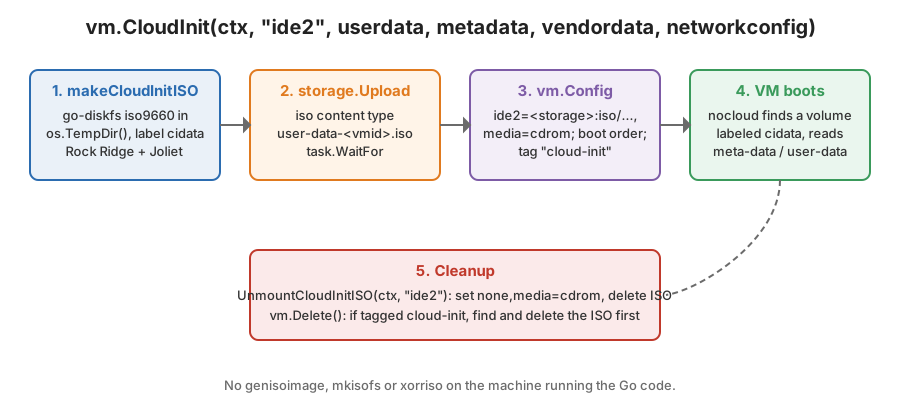
All the interesting work is in makeCloudInitISO(). go-diskfs needs a backing file, so it creates an empty one in the OS
temp dir. It wraps it and creates an ISO 9660 filesystem on it with a 2048-byte block size:
func makeCloudInitISO(filename, userdata, metadata, vendordata, networkconfig string) (isopath string, err error) {
	isopath = filepath.Join(os.TempDir(), filename)

	isoFile, err := os.Create(isopath)
	if err != nil {
		return "", err
	}

	if err := isoFile.Close(); err != nil {
		return "", err
	}

	iso, err := file.OpenFromPath(isopath, false)
	if err != nil {
		return "", err
	}

	defer func() {
		if cerr := iso.Close(); cerr != nil && err == nil {
			err = cerr
		}
	}()

	fs, err := iso9660.Create(iso, 0, 0, blockSize, "")
	if err != nil {
		return "", err
	}

	if err = fs.Mkdir("/"); err != nil {
		return "", err
	}
Then it writes whichever files were provided. The Close() inside the loop matters. With Joliet enabled, go-diskfs v1.9
records each file’s size when its handle closes. Writing without closing before Finalize gives you a Joliet tree with the
wrong sizes. (I found that one while switching go-proxmox over to Joliet for v0.5.0.)
	cifiles := map[string]string{
		"user-data": userdata,
		"meta-data": metadata,
	}
	if vendordata != "" {
		cifiles["vendor-data"] = vendordata
	}
	if networkconfig != "" {
		cifiles["network-config"] = networkconfig
	}

	for name, content := range cifiles {
		rw, err := fs.OpenFile("/"+name, os.O_CREATE|os.O_RDWR)
		if err != nil {
			return "", err
		}

		if _, err = rw.Write([]byte(content)); err != nil {
			return "", err
		}

		// Joliet finalization in go-diskfs v1.9+ requires the file handle to
		// be closed before Finalize so its size is recorded correctly.
		if err = rw.Close(); err != nil {
			return "", err
		}
	}
And finalize, which is where the actual ISO layout gets written:
	if err = fs.Finalize(iso9660.FinalizeOptions{
		RockRidge:        true,
		Joliet:           true,
		VolumeIdentifier: volumeIdentifier, // "cidata"
	}); err != nil {
		return "", err
	}

	return
}
Both extensions are on for a reason. Plain ISO 9660 names are 8.3 uppercase, so user-data is stored as USER_DAT.;1.
Rock Ridge adds the real name in a way Linux reads, along with POSIX modes and timestamps. That’s what cloud-init on a
Linux guest sees. Joliet adds a second directory tree with UCS-2 names. That’s the only thing Windows reads, and it’s
what cloudbase-init needs. The go-diskfs post has the full story of
getting both right. That includes the bug where the Joliet label came out as 捩摡瑡.
The result is tiny. A three-file ISO like this comes in well under 100 KB.
Uploading and mounting
CloudInit() strings the rest together. It builds the ISO and always removes the temp file on the way out. Then it resolves
which storage to use, uploads, tags the VM and points a CD-ROM drive at the ISO:
func (v *VirtualMachine) CloudInit(ctx context.Context, device, userdata, metadata, vendordata, networkconfig string, opts ...CloudInitOption) error {
	var cfg cloudInitConfig
	for _, opt := range opts {
		opt(&cfg)
	}

	isoName := fmt.Sprintf(UserDataISOFormat, v.VMID) // user-data-<vmid>.iso
	isofilename, err := makeCloudInitISO(isoName, userdata, metadata, vendordata, networkconfig)
	if err != nil {
		return err
	}

	defer func() {
		if rerr := os.Remove(isofilename); rerr != nil {
			v.client.log.Warnf("failed to remove temp cloud-init iso %s: %v", isofilename, rerr)
		}
	}()

	node, err := v.client.Node(ctx, v.Node)
	if err != nil {
		return err
	}

	storage, err := resolveCloudInitStorage(ctx, node, &cfg)
	if err != nil {
		return err
	}

	task, err := storage.Upload("iso", isofilename)
	if err != nil {
		return err
	}

	// iso should only be < 5mb so wait for it and then mount it
	if err := task.WaitFor(ctx, 5); err != nil {
		return err
	}

	_, err = v.AddTag(ctx, MakeTag(TagCloudInit))
	if err != nil && !IsErrNoop(err) {
		return err
	}

	task, err = v.Config(ctx, VirtualMachineOption{
		Name:  device,
		Value: fmt.Sprintf("%s:iso/%s,media=cdrom", storage.Name, isoName),
	}, VirtualMachineOption{
		Name:  "boot",
		Value: fmt.Sprintf("%s;%s", v.VirtualMachineConfig.Boot, device),
	})
	if err != nil {
		return err
	}

	return task.WaitFor(ctx, 2)
}
The storage selection is the new bit in v0.6.0 (#272). It closes a
long-standing #119. Before, the ISO went to the first enabled
storage on the node that accepted iso content. That’s non-deterministic when a node has more than one. Now
WithCloudInitStorage("name") picks one explicitly and validates that it takes ISOs:
func resolveCloudInitStorage(ctx context.Context, node *Node, cfg *cloudInitConfig) (*Storage, error) {
	if cfg.storage == "" {
		return node.StorageISO(ctx)
	}
	s, err := node.Storage(ctx, cfg.storage)
	if err != nil {
		return nil, fmt.Errorf("cloud-init storage %q: %w", cfg.storage, err)
	}
	if !strings.Contains(s.Content, "iso") {
		return nil, fmt.Errorf("cloud-init storage %q does not accept iso content (got %q)", cfg.storage, s.Content)
	}
	return s, nil
}
Cleaning up after yourself
The cloud-init tag is how go-proxmox remembers that a VM has an ISO lying around. Once the guest has booted and cloud-init
has done its thing, vm.UnmountCloudInitISO(ctx, "ide2") empties the drive (none,media=cdrom) and deletes the ISO. And
vm.Delete() checks for the tag first and removes the ISO before deleting the VM. That way you don’t slowly fill your ISO
storage with user-data-1xx.iso files from VMs that no longer exist. Since the storage is now selectable, the delete path
scans every enabled ISO-capable storage on the node for the file. It doesn’t assume the default one.
Why not just shell out
I like the benefits of keeping this in-process. There’s nothing to install on the machine that runs the automation. The same code works from a Linux CI runner, my Mac and the Windows box I’m writing this on. The ISO is built from strings in memory and a temp file. There’s no templating a directory tree on disk and no parsing a subprocess’s exit code. And it’s easy to test, because the ISO is just bytes you can read back with the same library.
If you want the ISO without the Proxmox part, I have an old standalone CLI called quiso that does the same job from the command line.
Links
- go-proxmox
- go-diskfs - the iso9660 implementation under the hood
- go-diskfs: Getting Rock Ridge Working for Joliet on Windows
- nocloud datasource docs
- cloudbase-init
- quiso