Staying Logged In to Proxmox: Ticket Renewal, Expiry and Where API Tokens Stop
Proxmox tickets die after two hours. How go-proxmox went from never re-authenticating to renewing tickets in place, plus the one thing API tokens can't do.
Back in 2023 I wrote up how go-proxmox logs in and ended it with a shrug. Once a session existed the client never logged in again. A ticket-based client died at the two hour mark. My advice was “use an API token for anything long running”. It took until this month to fix that properly. It took three PRs from two of us to get there. Here’s the whole arc, plus the one place where an API token isn’t an option at all.
Step one: stop racing yourself
The original 401 handler looked like this:
if c.credentials != nil && c.session == nil {
	// credentials passed but no session started, try a login and retry the request
	if _, err = c.Ticket(ctx, c.credentials); err != nil {
		return err
	}
	return c.Req(ctx, method, path, data, v)
}
return ErrNotAuthorized
Two problems. The obvious one is c.session == nil, which means “log in once, ever”. The less obvious one is that
c.session is read and written by whatever goroutine got the 401. A client is usually shared. Fire ten requests at a
fresh client from ten goroutines and you get ten logins writing the same field.
#223 from Serge Logvinov put a mutex around it. It also moved the
login into CreateSession, which returns ErrSessionExists if somebody else already did the work.
Step two: know when it’s stale
That still never re-logged in. #239, also from Serge, added an
expiry so CreateSession treats an old session as gone:
if c.session != nil && time.Now().Before(c.sessionExpiresAt) {
	return ErrSessionExists
}
// ...
c.sessionExpiresAt = time.Now().Add(time.Hour)
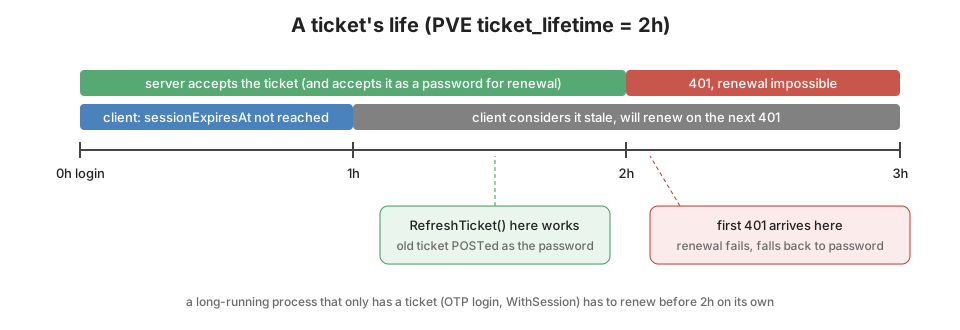
Proxmox tickets are good for two hours ($ticket_lifetime = 3600 * 2 in PVE::AccessControl). The client calls them
stale after one. That leaves plenty of slack for clock skew between you and the cluster. From here a credential-based
client survives. The ticket dies at two hours and the next request gets a 401. CreateSession sees a stale session and
logs in again with the stored password.
Step three: renew without the password
That fixed username and password logins. It didn’t fix two cases people had been asking about since 2024.
#181 wanted to renew with the existing ticket instead of keeping
the password around. #196 was throwing away the whole
*Client on auth failure and building a new one. That orphaned every cached *VirtualMachine and *Node that held a
pointer to the old client. And if your login used a TOTP code, re-sending the stored credentials doesn’t work at all.
The code is single use.
Proxmox has a documented answer for this: POST /access/ticket with the current ticket as the password. On the server
side create_ticket runs verify_ticket on the password field first. It only falls back to a real password check if
that fails. #267 wires that up:
func (c *Client) RefreshTicket(ctx context.Context) error {
	c.sessionMux.Lock()
	defer c.sessionMux.Unlock()
	return c.refreshTicketLocked(ctx)
}

func (c *Client) refreshTicketLocked(ctx context.Context) error {
	if c.session == nil || c.session.Ticket == "" {
		return ErrNoSession
	}
	if _, err := c.Ticket(ctx, &Credentials{
		Username: c.session.Username,
		Password: c.session.Ticket,
	}); err != nil {
		return err
	}
	c.sessionExpiresAt = time.Now().Add(time.Hour)
	return nil
}
CreateSession now tries a renewal first when it has a session. It only falls back to the full credential login if that
fails. The session is replaced on the existing *Client. Every resource handle hanging off it picks up the new ticket
without doing anything. That’s the #196 fix: stop rebuilding clients.
Renewal is on you, though
Here is the part that I think is easy to get wrong. I had to read the Perl to be sure. Renewal only works with a ticket
that is still valid. verify_ticket checks the signature and the age against the same two hour lifetime. An expired
ticket is just a wrong password. The client only reacts to a 401, and Proxmox doesn’t send a 401 until the ticket is
already past two hours. So the automatic path in CreateSession is mostly going to fall through to the password login.
Some clients have no password to fall back to, like an OTP login or one built WithSession from somebody else’s
ticket. For those that’s the end of the session.
If you’re in that situation, renew on a timer and stay inside the window:
go func() {
	t := time.NewTicker(45 * time.Minute)
	defer t.Stop()
	for {
		select {
		case <-ctx.Done():
			return
		case <-t.C:
			if err := client.RefreshTicket(ctx); err != nil {
				log.Printf("proxmox ticket refresh: %v", err)
			}
		}
	}
}()
One more wart I know about and haven’t fixed yet. Two goroutines can hit a 401 at the same moment. The first one renews.
The second one waits on the mutex, finds a fresh session and gets ErrSessionExists. Req turns that into
ErrNotAuthorized instead of retrying with the new ticket. It’s a narrow window, and the fix is a retry rather than an
error. But it’s there.
The cost of logging in lazily
While I was in here the v0.7 work added a few auth options worth knowing about. WithOTP stashes a single TOTP code. It
zeroes the code after the first login so a later re-login doesn’t resend a dead code. WithDefaultRealm("pam") turns
root into root@pam so you stop getting 401s for forgetting the realm.
WithEagerAuth is the one with a story. The client has always logged in lazily. The first request goes out without
auth and gets a 401. Then the client logs in and retries. What I didn’t know in 2023 is that pveproxy deliberately
slows down every 401:
if ($res->{status} == HTTP_UNAUTHORIZED) {
    # always delay unauthorized calls by 3 seconds
    $delay = 3 - tv_interval($reqstate->{starttime});
So every credential-based client has been paying three seconds on its first call since the beginning.
WithEagerAuth logs in inside NewClient instead, so that cost moves to startup. It swallows the error because options
can’t return one. If it failed, the lazy path still kicks in on the first request. If you need to know at startup that
your password is wrong, call CreateSession yourself.
Where API tokens stop
API tokens are still the right answer for most automation. One header, no CSRF token, no two hour clock. Except for
terminals. #221 reported that opening a container terminal
failed with an opaque failed to create terminal websocket: unexpected EOF. It turned out to be three separate bugs in
the websocket handshake (#259).
Two of them were mine, from the 2022 xterm.js post. The UI opens
the socket with new WebSocket(url, "binary"). The vncwebsocket handler hangs up on clients that don’t ask for the
binary subprotocol. So the dialer now sends Subprotocols: []string{"binary"}. And the resize message is
1:<cols>:<rows>:, width first. I wrote it height first in 2022. It’s right there in that post’s resize code. It took
four years for anyone, me included, to notice their terminal coming out transposed.
The third is a Proxmox limitation on older releases. Through PVE 8 and early PVE 9, termproxy verified the VNC ticket
through /access/ticket. There verify_username rejects the !tokenname suffix a token user carries. The ticket’s
HMAC is bound to that same name, so stripping the suffix on the client side doesn’t work either. Newer PVE 9 ships a
/access/vncticket endpoint that accepts a token id. Node shells got it in pve-manager 9.0.13 in November 2025.
Guest terminals got it with this spring’s qemu-server and pve-container updates. But go-proxmox doesn’t detect the
server version yet. For now the client fails fast with a sentinel instead of the mystery EOF:
// ErrAPITokenWebSocketUnsupported is returned by TermWebSocket and VNCWebSocket
var ErrAPITokenWebSocketUnsupported = errors.New("proxmox does not accept API tokens for vncwebsocket; use WithCredentials or WithSession")
So if your tool targets PVE 8 and needs both automation and a shell, it needs a ticket for the shell. Now the ticket can stay alive.