Logging In to Proxmox From Go: Tickets, CSRF Tokens and API Tokens
Proxmox VE has two ways to authenticate against its API. Here's how go-proxmox handles each one and why the client is now configured entirely with functional options.
I just spent a week of evenings on the access side of go-proxmox. Realms, groups, users and roles all landed. Before any of that, I reworked how a client gets its credentials in the first place. Proxmox gives you two different ways to authenticate. They behave differently enough that it’s worth writing down how each one works on the wire and what the client does with it.
Tickets
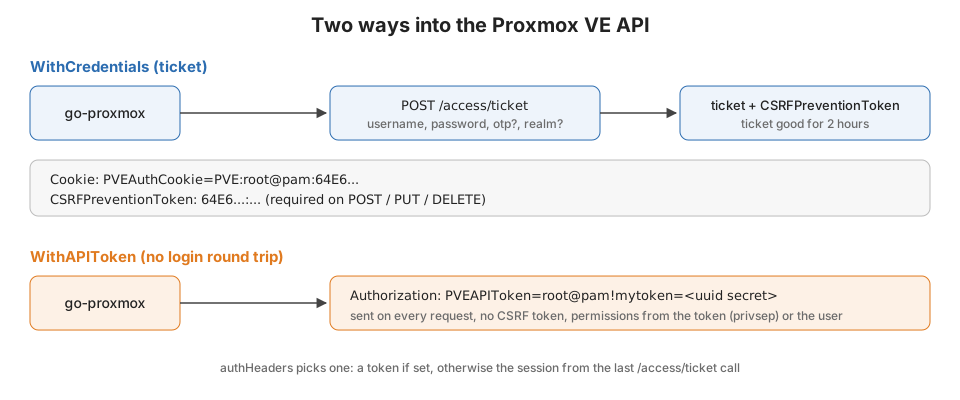
This is what the web UI does. You POST /access/ticket with a username and password and get back a ticket and a CSRF
token. Add an otp if the user has TFA, and optionally a realm:
type Credentials struct {
	Username string `json:"username"`
	Password string `json:"password"`
	Otp      string `json:"otp,omitempty"` // One-time password for Two-factor authentication.
	Path     string `json:"path,omitempty"`
	Privs    string `json:"privs,omitempty"`
	Realm    string `json:"realm,omitempty"`
}

type Session struct {
	Username            string `json:"username"`
	CSRFPreventionToken string `json:"CSRFPreventionToken,omitempty"`

	// Cap is being returned but not documented in the API docs, likely will get rewritten later with better types
	Cap         map[string]map[string]int `json:"cap,omitempty"`
	ClusterName string                    `json:"clustername,omitempty"`
	Ticket      string                    `json:"ticket,omitempty"`
}
The ticket goes back to Proxmox as a cookie named PVEAuthCookie. The CSRFPreventionToken goes in a header of the
same name. Proxmox requires it on every request that writes (POST, PUT, DELETE). A GET with just the cookie
works. A POST with just the cookie gets you a 401, which is a fun one to debug the first time. The client sends both
on every request, so you never have to think about it.
The thing to know about tickets is that they expire. Proxmox signs them with a lifetime of two hours
($ticket_lifetime = 3600 * 2 in PVE::AccessControl). That’s great for a browser tab and less great for a daemon.
API tokens
Tokens are the better fit for automation. You create one under a user in the UI (Datacenter, Permissions, API Tokens).
You get a token ID like root@pam!mytoken and a UUID secret, shown exactly once. There is no login round trip. You
send a single header on every request:
Authorization: PVEAPIToken=root@pam!mytoken=<uuid secret>
No CSRF token, no cookie, and no two hour expiry. Tokens can have an expiry date but default to none. The one decision
you make when creating one is privilege separation. With privsep on, which is the default, the token only gets the
permissions you grant to the token itself. With it off, the token has everything the user has. For a CI job or a
provisioning tool I always leave it on and grant exactly what the tool needs.
Picking between the two happens in one place in the client:
func (c *Client) authHeaders(header *http.Header) {
	header.Add("User-Agent", c.userAgent)
	header.Add("Accept", "application/json")
	if c.token != "" {
		header.Add("Authorization", "PVEAPIToken="+c.token)
	} else if c.session != nil {
		header.Add("Cookie", "PVEAuthCookie="+c.session.Ticket)
		header.Add("CSRFPreventionToken", c.session.CSRFPreventionToken)
	}
}
Logging in lazily
When you give the client credentials, it doesn’t log in when you construct it. The first request goes out with no
auth, and Proxmox answers 401. Req notices it has credentials but no session. It grabs a ticket and replays the
request:
if res.StatusCode == http.StatusUnauthorized || res.StatusCode == http.StatusForbidden {
	if path == (c.baseURL + "/access/ticket") {
		// received an unauthorized while trying to create a session
		return ErrNotAuthorized
	}

	if c.credentials != nil && c.session == nil {
		// credentials passed but no session started, try a login and retry the request
		if _, err := c.Ticket(c.credentials); err != nil {
			return err
		}
		return c.Req(method, path, data, v)
	}
	return ErrNotAuthorized
}
NewClient can’t return an error the way it’s built. I didn’t want a constructor that makes network calls anyway, so
lazy login keeps it cheap. The /access/ticket check is there so a bad password returns ErrNotAuthorized instead of
recursing.
Read that c.session == nil condition again though. Once a session exists, the client never logs in again. So when
the ticket hits its two hour limit, every call after that comes back ErrNotAuthorized. For a CLI that runs for ten
seconds that’s irrelevant. For something long running, use an API token until I get renewal sorted out.
Everything is an option now
The other half of this round of work was getting rid of the setters. The client used to have client.Login(user, pass) and client.APIToken(id, secret) that you called after NewClient. That meant there was a window where you
had a client that wasn’t configured yet. Now everything goes through functional options:
type Option func(*Client)

func WithCredentials(credentials *Credentials) Option {
	return func(c *Client) {
		c.credentials = credentials
	}
}

func WithAPIToken(tokenID, secret string) Option {
	return func(c *Client) {
		c.token = fmt.Sprintf("%s=%s", tokenID, secret)
	}
}

// WithSession experimental
func WithSession(ticket, CSRFPreventionToken string) Option {
	return func(c *Client) {
		c.session = &Session{
			Ticket:              ticket,
			CSRFPreventionToken: CSRFPreventionToken,
		}
	}
}
WithSession is for when something else already did the login, like a web app that is passing through a user’s
ticket. The old Login, APIToken, WithLogins and WithClient are still there. They have // Deprecated:
comments pointing at the replacements, so nobody’s build breaks on the next alpha.
A token client with a self-signed lab cert looks like this:
insecureHTTPClient := http.Client{
	Transport: &http.Transport{
		TLSClientConfig: &tls.Config{
			InsecureSkipVerify: true,
		},
	},
}

client := proxmox.NewClient("https://localhost:8006/api2/json",
	proxmox.WithHTTPClient(&insecureHTTPClient),
	proxmox.WithAPIToken("root@pam!mytoken", "somegeneratedapitokenguidefromtheproxmoxui"),
)

version, err := client.Version()
if err != nil {
	panic(err)
}
fmt.Println(version.Release)
Users and their tokens are readable from Go now too. The token list comes back on the user. So the next step is the write side: creating a token from a password-based client and handing it to whatever runs unattended. That’s how I want the integration tests to bootstrap themselves.