Operating the One-Box ePHPm Setup: Backups and Blue/Green
Day-two work on the single-VM ePHPm box: a golden AMI that smoke-tests itself, an S3 backup that survives on a box too small to hold two copies of the database, and a blue/green upgrade that moves the data instead of the disk.
The golden AMI: immutable code, mutable data
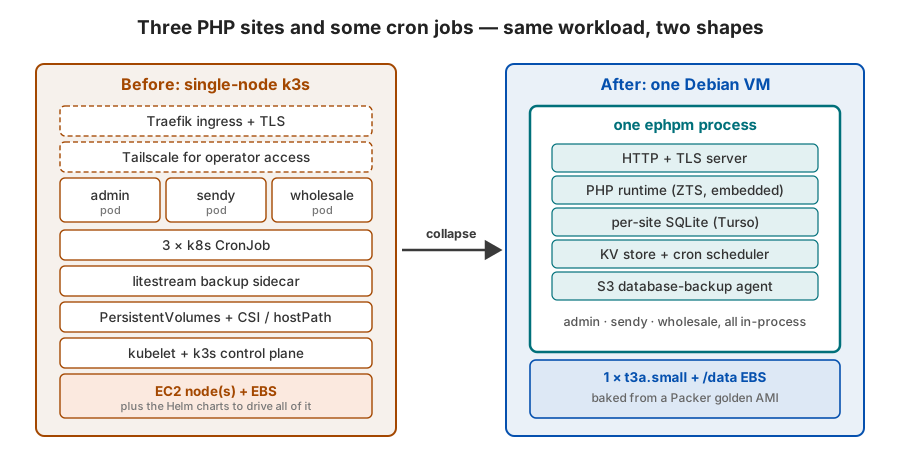
The box is baked, not configured in place. Packer builds a Debian 12 AMI with the ePHPm binary and all three apps’ code
already on disk. The source gets pulled from the three private GitHub repos’ tarballs at build time and run through
composer install right there in the image. Rolling new code means baking a new AMI.
Debian 12 specifically, because the admin app’s imagick build is compiled against glibc 2.36 and bookworm is that exact version. (That ABI pin is also why the box stayed on AWS amd64 instead of chasing a free ARM tier. That’s the cost math in part one.)
The split is the important bit. The image is immutable code; the mutable state lives elsewhere. The SQLite
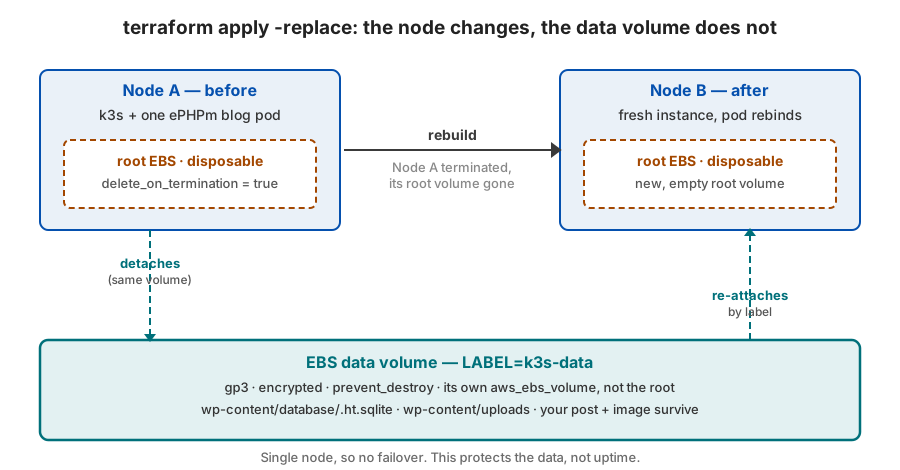
databases and Sendy’s uploads live on a separate EBS data volume at /data, the same durable-volume trick from the
node-rebuild post. Secrets never get baked. They arrive at
launch through cloud-init, which writes a 0600 env file the service reads. The AMI holds code, the volume holds data, the
launch holds secrets.
The part I like most is the build-time smoke test. Before Packer registers the AMI, a script boots ePHPm from the baked
config, waits for it to listen, and asserts all three sites answer: wholesale’s /ping returns 200 and its listing
renders, admin and sendy route. If any of that fails, the build fails and no broken image ships. A bad config dies in CI,
not in production.
S3 is the floor
A dedicated EBS volume survives a node rebuild. It does not survive a bad DROP, a corrupt filesystem, or losing the
whole VM. So ePHPm ships every embedded database to S3 on a schedule: a VACUUM INTO of each database, gzipped, uploaded
as a timestamped object, kept 14 days, interval configurable per database. Lose the box and you restore onto a fresh one
with ephpm db restore. S3 is the recovery floor.
There’s a real subtlety I hit head-on. Sendy’s database is about 1.2 GB (530,281 subscribers) and gzips to roughly
457 MB a snapshot. A naive VACUUM INTO of a database that size wants about twice the file resident in memory, which
OOM-kills a 2 GB box. ePHPm runs a bounded snapshot inside its own process instead, so peak memory tracks your largest
single index, not the whole file. Call it 66 MiB plus twice your biggest index. That’s the difference between a backup
that works on a t3a.small and one that kills it.
That bound is also why the S3 line stays small. A fifteen-minute snapshot of Sendy kept 14 days is ~600 GB and would cost more than the instance, so I run it hourly. That’s the recovery point I’m comfortable with for a mailer. Admin and wholesale are a few megabytes each. The big one is the only one you tune.
The bounded path isn’t ePHPm sleight of hand. It’s a change to the engine. Stock Turso builds the VACUUM INTO target
in one shot, which is where that doubled memory comes from. I reworked it to build the target in batches so the statement
runs in bounded memory, and sent it upstream as tursodatabase/turso#11503.
It’s still open, so ePHPm carries it in an org mirror of Turso pinned a few patches ahead of the upstream release. On a box
this small the backup agent doesn’t run without it.
It also reads a pinned snapshot of the source, so the copy is internally consistent even while Sendy is being written the
whole time the backup runs. A real point-in-time, not a smear. That’s an upstream change too:
tursodatabase/turso#11808 opens a read transaction on the source
before the copy begins, so the page images stay pinned for the whole VACUUM INTO instead of shifting under it. It rides
in the same mirror; the consistency landed in ePHPm v0.16.4, and it’s why I re-baked. An hourly backup of a busy mailer is
exactly where a torn snapshot would bite.
Blue/green without moving the disk
Here’s the problem with immutable images and a stateful box: you can’t attach one EBS volume to two VMs at once. So the durable-volume move (detach the disk, re-attach it to the new node) doesn’t help you do a zero-downtime upgrade. The disk is busy on the live node.
ePHPm’s clustered mode solves it by moving the data instead of the disk. Node A is blue and holds the live data. To ship a new AMI, I bring up node B as green, on the new image, with its own empty EBS volume. The two form a short-lived cluster, and each site’s SQLite replicates from A to B over the cluster channel using Turso change-data-capture: a snapshot bootstrap, then a stream of the changes. Once B has converged, I move the Elastic IP from A to B and retire A. The Elastic IP is the stable public address; it’s what makes the swap invisible from outside.
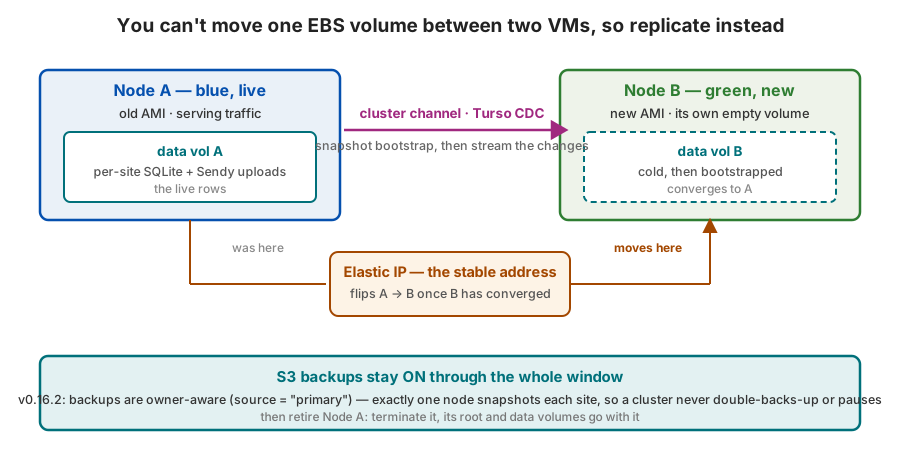
The part that matters most is proving no data is lost across that cutover. I tested it the blunt way: wrote a probe into A (1,000 rows with a known checksum), let it replicate, stopped A, and confirmed B returned the exact rows. That’s the test I trust, not a diagram.
Two honest caveats, because this is newer ground than the rest.
First, backups and clustering used to fight. Before ePHPm v0.16.2 you had to turn S3 backups off during a blue/green
window, precisely when you least want to fly without a net. v0.16.2 made backups owner-aware (source = "primary"), so
exactly one node, the write owner, takes the snapshot, and S3 stays on through the whole upgrade. The box is baked on
v0.16.4, so it’s had that fix from the first bake.
Second, the lossless guarantee has a shape. ePHPm’s provable drain-without-loss is for whole-database clustered mode: one shared database, an elected primary. This box runs per-site clustered mode, one database per vhost, which is the experimental path, so I don’t get the automatic drain gate here. I keep a manual converge-then-cut-over step: watch CDC catch up, run the probe, then flip the IP. For a store I upgrade on purpose in a quiet window, a manual gate I can watch is fine. I’m not pretending it’s the automatic one.
What’s next: turning the same binary up
This box is single-node on purpose. The workload is small enough that one machine on spot is the right call, and the manual blue/green cut-over is fine for an upgrade I run in a quiet window. The interesting question is what changes when the site isn’t small: same binary, same AMI, same S3 floor, but something that has to stay up under real traffic.
That’s a different Auto Scaling Group. Instead of min = max = 1 with an Elastic IP that moves, you run a multi-node group
behind a load balancer, and the single-node choices flip. Capacity rebalancing goes on. With a fleet serving, you
want AWS to replace an at-risk node early instead of riding it into a hard interruption. You set an on-demand floor
(on_demand_base) so a spot dip can’t take the whole group. And the Elastic-IP move retires: the load balancer
health-checks the nodes, and a dead one drops out of rotation.
The data is where it gets real: the blue/green gap seen from the other side. More than one ePHPm serving the same site
means more than one writer, and SQLite is one writer per database. So scaling means whole-database clustered mode: one
shared database, an elected primary that takes writes, and replicas that follow it over CDC and serve reads. That’s the
mode with the provable lossless drain: lose the primary and a new one is elected without dropping a write, the --reseed
gate. The per-site mode this box runs doesn’t have that gate yet; the automatic per-site drain is the roadmap item that
would make a multi-node per-vhost group safe. Backups already come along for free: owner-aware snapshots mean exactly one
node takes the S3 copy, however many are running.
The honest shape of it: this scales reads, not writes. More nodes buy read capacity and failover headroom; the write path stays a single primary, because the store is still SQLite. Behind a CDN, for a read-heavy site, that’s plenty. That’s most sites. For a write-heavy one it’s the wrong tool, and no ASG knob changes that. For now the single box is up, the data has an S3 floor under it, and scaling it out is the same binary turned up: a load balancer, a bigger group, and a whole-database primary.
Links
- Part one: Replacing a k3s Cluster With One ePHPm Process
- Surviving a Node Rebuild: Durable Data on Single-Node k3s
- ePHPm
- Clustered SQLite: Adding Turso
- Turso #11503: batch the
VACUUM INTOtarget so the statement runs in bounded memory - Turso #11808: begin a read transaction on the source for
VACUUM INTO - Rolling Your Own KV Store