Surviving a Node Rebuild: A Durable ePHPm Blog on Single-Node k3s
A compact ePHPm WordPress blog on one k3s node, with its SQLite file and uploads on a dedicated EBS volume. Rebuild the whole node and the data comes back.
A single ePHPm binary runs a whole WordPress site. No php-fpm, no Redis, no MySQL. The database is a SQLite file. I covered that setup in Zero-Dependency Deployments. It makes for a tiny blog: one process, one file, a distroless image around 270 MB. That fits a micro VM with room to spare.
So I put one on a micro EC2 instance with single-node k3s. One box, one kubectl, no control-plane sprawl. You create a
PersistentVolumeClaim, the blog binds to it, and it looks like your data is safe.
It is not. Not the way you think.
The default k3s storage class is local-path. It writes its volumes under /var/lib/rancher/k3s/storage on the node.
That path is on the instance’s root EBS volume. The root volume is delete_on_termination = true. So the first time
you replace the node, the root volume goes with it, and your SQLite file goes with it. Not detached. Gone.
You replace the node more often than you think. An AMI bump. An instance resize. A terraform apply that decides the
instance needs recreating. Plenty of people meet this in production, right after a routine change, with the only copy of
their data on the other end of it.
This post is the fix. Put the stateful bytes on a dedicated EBS volume that outlives the node. Then prove it by rebuilding the whole node and watching the blog come back untouched. The app is the single-binary ePHPm blog from that earlier post, so every value here is one you can copy.
One thing up front. This is about durability, not availability. It is a single node. If the node is down, the blog is down. There is no failover here. What this buys you is that your data survives the node, not that your readers never see an error page. Those are different problems. This post is the data one.
Root is cattle, data is a pet
The mental model is the whole trick. Treat the root volume as disposable. It holds the OS, the k3s binary and the container images. You can throw it away and rebuild it from Terraform and cloud-init in a few minutes. Nothing on it is precious.
The data volume is the opposite. It is a separate EBS volume that Terraform is told never to delete. It carries every stateful byte. For this blog that is two things. The WordPress SQLite database. The uploads directory. Everything else, the ePHPm binary and the WordPress code, lives in the image. The data volume detaches from a dying node and re-attaches to the next one. The node is cattle. The data volume is a pet.
Keep those two apart and a node rebuild stops being scary.
Prerequisites
- One EC2 instance running k3s, provisioned with Terraform.
- Terraform 1.5+ and
kubectlpointed at the cluster. - AWS credentials that can manage EC2 and EBS.
- The ePHPm WordPress image from the single-binary post, pushed to a registry your node can pull.
- A willingness to destroy and recreate the instance on purpose. That is the whole point.
The data volume in Terraform
The important detail is that this is a standalone aws_ebs_volume, not a root_block_device on the instance. A root
block device shares the instance’s lifecycle. A standalone volume has its own.
resource "aws_ebs_volume" "data" {
  availability_zone = aws_subnet.a.availability_zone
  size              = var.data_volume_size # e.g. 20
  type              = "gp3"
  encrypted         = true

  tags = {
    Name   = "k3s-data"
    Backup = "k3s-data" # matched by a DLM snapshot policy later
  }

  lifecycle {
    prevent_destroy = true # Terraform refuses to delete the one stateful thing
  }
}

resource "aws_volume_attachment" "data" {
  device_name  = "/dev/sdf" # Nitro surfaces this as /dev/nvme1n1; we mount by label, not this
  volume_id    = aws_ebs_volume.data.id
  instance_id  = aws_instance.k3s.id
  skip_destroy = true # replacing the instance detaches the volume, never destroys it
}
Two lines do the heavy lifting. prevent_destroy = true on the volume means Terraform errors out rather than delete it.
If you ever write a plan that would take the volume with it, Terraform stops you. skip_destroy = true on the attachment
means that when the instance is replaced, Terraform tears down the attachment without trying to detach the busy volume
first. AWS releases the volume cleanly when the old instance terminates. Without these two, a -replace of the instance
can reach down and destroy the volume as a dependency. With them, the volume is untouchable.
One constraint comes with the volume. It lives in one Availability Zone. The replacement instance has to come back in that same AZ, or the attach fails. Keep the instance pinned to the same subnet and you are fine.
The root volume stays disposable, and you say so out loud:
root_block_device {
  volume_type           = "gp3"
  volume_size           = 20
  delete_on_termination = true # cattle, nothing stateful lives here
}
Mount it by label, not by device
This is where people get burned. On Nitro instances the device name you asked for is not the device name you get. You
attach at /dev/sdf and the kernel surfaces it as /dev/nvme1n1. The NVMe enumeration order is not guaranteed to stay
put across reboots either. So you never mount by device path. You format the volume with a filesystem label once, and
you mount by that label forever.
Here is the cloud-init that runs on first boot:
# Resolve the disk by its EBS volume ID, never a device number. AWS exposes the
# volume as its NVMe serial: the volume ID with the dashes stripped. Terraform
# templates the ID into this cloud-init.
DATA_DEV="/dev/disk/by-id/nvme-Amazon_Elastic_Block_Store_$(echo "${aws_ebs_volume.data.id}" | tr -d '-')"

# Format only if it has no filesystem yet. A volume with data already on it is skipped.
blkid "$DATA_DEV" >/dev/null 2>&1 || mkfs.ext4 -L k3s-data "$DATA_DEV"

mkdir -p /data
grep -q 'LABEL=k3s-data' /etc/fstab || \
  echo 'LABEL=k3s-data /data ext4 defaults,nofail 0 2' >> /etc/fstab
mount -a

# The distroless image runs as the nonroot user 65532. Give it the data dirs.
mkdir -p /data/wordpress/database /data/wordpress/uploads
chown -R 65532:65532 /data/wordpress
Three things matter here. The blkid guard means the format only happens on a blank volume. On a rebuild the volume
already has a filesystem, so mkfs is skipped and your data is left alone. The LABEL=k3s-data entry in /etc/fstab
mounts the right volume no matter what device letter it landed on. And nofail means that if the volume is ever absent,
the node still boots instead of dropping into an emergency shell.
The chown is easy to forget. ePHPm’s distroless image runs as the nonroot user 65532. The SQLite file and the uploads
dir have to be writable by that user, or the first request fails. The data dirs are created and owned here on the host,
once.
One cloud-init nuance is worth knowing. On a fast boot the /dev/disk/by-id/ symlink may not exist yet when this runs. In
production you wait for udev to settle before formatting. A short retry loop does it. If the by-id path never appears, you
fall back to the single extra unmounted disk. The principle is the thing. You key off the volume’s identity, never the
NVMe enumeration order.
Back the PVCs with the mount
Now k3s needs PersistentVolumes that point at /data. I use static hostPath PVs with a manual storage class. One PV
and one PVC per data directory. Here is the database pair:
apiVersion: v1
kind: PersistentVolume
metadata:
  name: wp-sqlite
spec:
  storageClassName: manual
  capacity:
    storage: 5Gi
  accessModes: ["ReadWriteOnce"]
  persistentVolumeReclaimPolicy: Retain
  hostPath:
    path: /data/wordpress/database
---
apiVersion: v1
kind: PersistentVolumeClaim
metadata:
  name: wp-sqlite
spec:
  storageClassName: manual
  accessModes: ["ReadWriteOnce"]
  resources:
    requests:
      storage: 5Gi
  volumeName: wp-sqlite
Make a second identical pair for /data/wordpress/uploads, named wp-uploads. The storageClassName: manual setting
opts these out of the default local-path provisioner. Retain means that if you ever delete the PVC, k3s leaves the
data on disk rather than wiping it. And volumeName binds the claim to exactly the PV you made, so there is no guessing.
You might ask why static hostPath and not the EBS CSI driver. The CSI driver is the right answer when you need dynamic
provisioning or multi-node attach. Neither applies here. There is one node, the mount is always in the same place, and the
volume lifecycle is handled in Terraform where I can see it. Static hostPath means no CSI controller, no extra IAM role
and no moving parts. The CSI driver earns its keep on a real cluster. On one static node it is weight you do not need.
The blog on those PVCs
The app is one Deployment. The ePHPm image already carries the WordPress code, the SQLite drop-in and the binary. All it needs from us is a home for the two stateful directories. There is no database pod, no database Service and no database password, because the database is a file.
apiVersion: apps/v1
kind: Deployment
metadata:
  name: blog
spec:
  replicas: 1
  strategy:
    type: Recreate
  selector:
    matchLabels:
      app: blog
  template:
    metadata:
      labels:
        app: blog
    spec:
      containers:
        - name: ephpm
          image: registry.example/ephpm-wordpress:latest # the image you built and pushed
          ports:
            - containerPort: 8080
          volumeMounts:
            - name: sqlite
              mountPath: /srv/www/wp-content/database
            - name: uploads
              mountPath: /srv/www/wp-content/uploads
      volumes:
        - name: sqlite
          persistentVolumeClaim:
            claimName: wp-sqlite
        - name: uploads
          persistentVolumeClaim:
            claimName: wp-uploads
The SQLite drop-in keeps its database at wp-content/database/.ht.sqlite. WordPress keeps uploads at
wp-content/uploads. Mounting a PVC over each of those two directories is the whole persistence story. The rest of the
site, the code and plugins, stays in the image and is rebuilt from it every time. That is deliberate. Only the bytes you
actually generate live on the volume.
Note strategy: Recreate. The volumes are ReadWriteOnce and SQLite is a single writer. A rolling update would try to
start a second pod holding the same volume, and it would wedge. Recreate tears the old pod down before the new one comes
up. One replica, one writer, no fight over the disk.
To reach it, put a Service on port 8080 in front of the pod. On a single k3s node a LoadBalancer Service through the
built-in klipper load balancer, or a NodePort, sends traffic straight to the pod. There is no ingress and no reverse
proxy here. ePHPm is the HTTP server. It terminates TLS itself through its own [server.tls] config, so nothing sits in
front of it.
The proof: rebuild the node
This is the part that matters. Everything above is setup. Now we break it on purpose.
First, make some state you will recognize. Open the blog, write a post, and upload an image to it. The post text lands in
the SQLite file on /data/wordpress/database. The image lands on /data/wordpress/uploads. Both are on the data volume
now.
Start small. Kill the pod and watch it come back:
kubectl delete pod -l app=blog
# it reschedules, remounts the same PVCs, and the post and image are still there
That proves the PVCs survive a pod restart. Expected, but worth seeing. Now the real test. Replace the entire EC2 instance:
terraform apply -replace="aws_instance.k3s"
Watch what happens. Terraform destroys the old instance. Its root volume is deleted with it, exactly as designed. The data
volume is not touched, because prevent_destroy guards it and skip_destroy kept the attachment from dragging it down. A
new instance boots from the Terraform config. Its cloud-init runs, finds the data volume already carries a filesystem, so
it skips the format and mounts /data by label. k3s comes up, the static PVs rebind to the same hostPath directories,
and the pod schedules onto them.
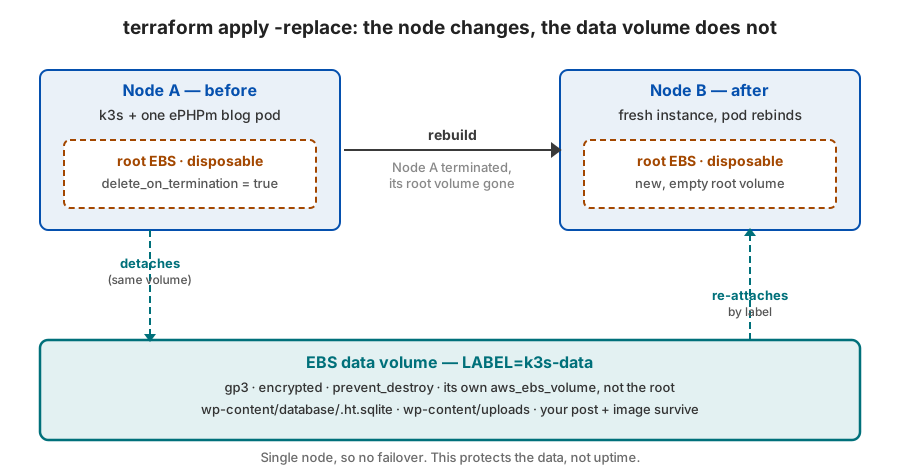
Then open the blog again. The post is there. The image is there. You rebuilt the machine from scratch and the data did not notice. That is the whole payoff. A fresh instance, a fresh root volume, and the same bytes.
A volume is not a backup
Be honest about what you have and what you do not. A dedicated EBS volume survives a node rebuild. It does not survive an
Availability Zone going away, a corrupted filesystem, or a DROP TABLE you ran against the wrong site. It is one copy in
one place. Two things turn it into a real recovery story.
The first is scheduled EBS snapshots through AWS Data Lifecycle Manager, matched by that Backup = "k3s-data" tag. Those
give you point-in-time copies in S3-backed storage.
The second is shipping the database itself off the box. SQLite has a clean way to do this. The sqlite3 .backup command
copies a live database safely. Run it on a schedule and send the file to a bucket. Now you have something to restore from
when the last snapshot is hours stale.
Durability against node loss is the floor, not the ceiling.
What’s next
The natural follow-up is making the single node less of a single point of failure without pretending it is a cluster.
Scheduled snapshots and an automated restore drill are the first step. After that, the honest upgrade is a second node and
a real CSI driver. At that point the trade-offs in this post flip. The simple hostPath approach gives way to dynamic
provisioning. And a single SQLite file gives way to ePHPm’s clustered mode, which I covered in the
clustered SQLite series. I will cover the snapshot and restore drill in a
follow-up. For now, go rebuild a node on purpose and watch your blog not care.