Stop Ctrl-C-ing Your tail -f | grep
tail-gunner is a drop-in tail that promotes itself mid-stream into a live-filtering Bubble Tea TUI without restarting the stream.
Here’s a loop I end up in all the time:
tail -f app.log- something scrolls by that looks wrong, Ctrl-C
tail -f app.log | grep ERRORand wait for it to happen again- decide I also want to drop the health checks, Ctrl-C
| grep -v healthzand wait again
Every filter tweak throws away the stream and every line that already went past. I got tired of it and wrote
tail-gunner. It’s a tail replacement that you can promote into a filtering TUI with
one keystroke. You can drop back out of it without the stream ever stopping.
The tagline in the README is “it’s tail until you need more”. That’s the whole design. Everything below is as of
v0.0.1.
Three modes, picked at startup
The binary decides what it is based on where stdout goes:
- Pipe mode: stdout isn’t a terminal. It behaves byte-for-byte like GNU tail and none of the TUI code runs. Scripts and downstream pipes can’t tell the difference.
- Plain mode: stdout is a terminal and you’re following (
-f). It prints to your scrollback exactly like tail. A listener is waiting on the terminal for a:. - Gunner mode: the full-screen Bubble Tea TUI. Filters, stacked searches,
scrolling, piping the view through shell commands.
qdrops you back to plain mode.
The check in main.go is short, and it’s the part that makes alias tail=tail-gunner safe:
// Interactive (promotable) only when: following line-oriented output to
// a real terminal and not explicitly disabled. Everything else takes the
// byte-faithful tailcompat path — that is the drop-in contract.
interactive := opts.Follow &&
	!opts.NoPromote &&
	!opts.BytesSet &&
	term.IsTTY(os.Stdout)

if !interactive {
	os.Exit(tailcompat.Run(opts, os.Stdout, os.Stderr))
}
os.Exit(app.Run(opts))
The buffer is the product
Promotion only works if nothing gets lost while you’re switching. So ingestion is completely decoupled from rendering. A single
goroutine drains the source channel into a ring buffer. Only then does it hand the line to whoever is displaying. The ring holds
100k lines by default, and --gun-buffer changes it:
go func() {
	for ln := range stream.C {
		ring.Append(ln.File, ln.Text)
		p.print(ln.File, ln.Text)
		select {
		case notify <- struct{}{}:
		default:
		}
	}
}()
p.print is a no-op while the TUI owns the screen. The notify channel is a coalescing poke the TUI uses to know there’s new data.
Lines are addressed by a monotonic sequence number instead of a slice index. That keeps them stable while the ring evicts old
entries underneath you:
// Bounds returns the seq range currently retained: [first, next).
func (r *Ring) Bounds() (first, next uint64) {
	r.mu.RLock()
	defer r.mu.RUnlock()
	return r.first, r.next
}
Filters are a view over that buffer, not a stage in a pipeline. When you add :in ERROR, the view gets rebuilt by scanning the
whole ring. So you see the errors that scrolled past before you typed the filter. New lines get tested once on the way in. A
filter change costs one pass over at most 100k lines. A new line costs one test against the rule stack.
The rule stack itself has three kinds: in (keep), out (drop) and hl (highlight only). Multiple in rules OR together. Any
out match drops the line. Most of what I type is a plain word, so there’s a small fast path. If the pattern parses as a regex
literal, it uses bytes.Contains instead of the regexp engine.
func isLiteral(pattern string) bool {
	parsed, err := syntax.Parse(pattern, syntax.Perl)
	if err != nil {
		return false
	}
	return parsed.Op == syntax.OpLiteral
}
Promoting without stopping
The fiddly part is the keyboard. If you’re doing kubectl logs -f ... | tail-gunner -f, stdin is the log stream. So keystrokes have
to come from somewhere else. It’s the same trick fzf uses: open the controlling terminal directly. That’s two five-line files with
build tags, one constant each:
//go:build !windows
const ttyPath = "/dev/tty"
//go:build windows
const ttyPath = "CONIN$"
In plain mode a goroutine puts that tty into raw mode and reads a byte at a time. A : restores the terminal and signals the main
loop. The main loop stops plain printing and hands the same tty to Bubble Tea with tea.WithInput(tty) and the alt screen. Ctrl-C
shows up as byte 3 in raw mode, so that gets handled by hand too.
When you press q the TUI exits, and the main loop has to catch you up. Lines that arrived while you were in gunner mode get
replayed into the scrollback. The replay is capped at the last 10 lines, with a marker so you know what you skipped. The replay and
the switch back to plain printing happen under the same lock. A line can’t sneak in between them:
func replayMissed(ring *buffer.Ring, p *printer, fromSeq uint64) {
	p.mu.Lock()
	defer p.mu.Unlock()
	defer func() { p.plain = true }()

	_, next := ring.Bounds()
	missed := next - fromSeq
	if missed == 0 {
		return
	}
	start := fromSeq
	if missed > demoteReplayCap {
		fmt.Fprintf(os.Stdout, "--- tail-gunner: %d lines while in TUI, showing last %d ---\n",
			missed, demoteReplayCap)
		start = next - demoteReplayCap
	}
	ring.Range(start, func(l buffer.Line) bool {
		p.printLocked(l.File, l.Text)
		return true
	})
}
Filters survive the demotion too. If you leave gunner mode with :in ERROR set, plain mode keeps printing only errors until you :clear.
What it looks like
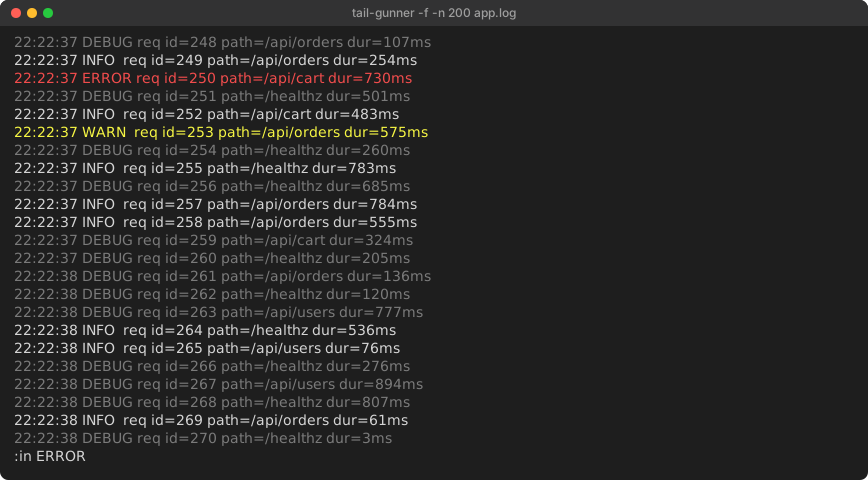
These are captures from a real run. A bash loop appended a fake request log every ~50ms, and tail-gunner -f -n 200 app.log
followed it in a 100x24 tmux pane. Pressing : opens the palette at the bottom. Lines are already auto-colored by severity:
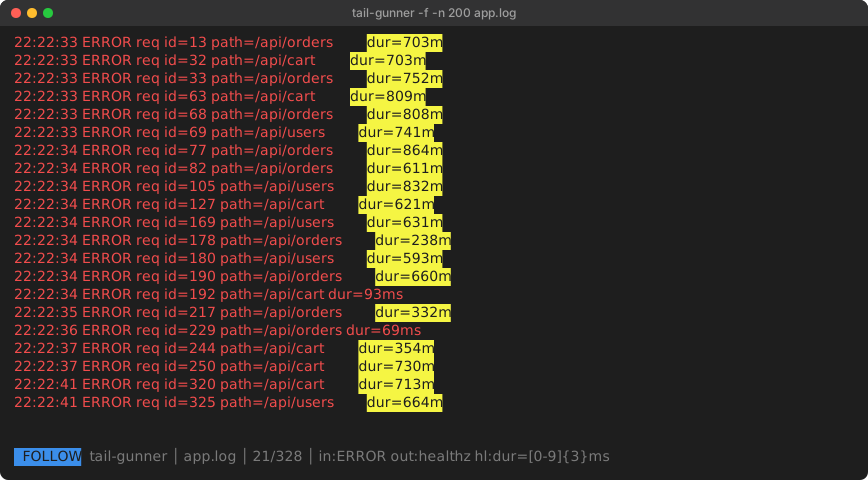
Then three commands: :in ERROR, :out healthz and :hl dur=[0-9]{3}ms. The status bar shows the filter chips and 21/328. That
means 21 of the 328 buffered lines pass. The top of that list is request id=13, which was written long before I typed the filter:
Pressing q from there printed this into the scrollback and kept following:
--- tail-gunner: 98 lines while in TUI, showing last 10 ---
22:22:41 ERROR req id=325 path=/api/users dur=664ms
22:22:44 ERROR req id=365 path=/api/cart dur=834ms
98 lines arrived while I was in the TUI. The last 10 of them got replayed. Only 2 of those 10 were errors that weren’t on
/healthz. The filters stuck, which is the behavior I wanted.
Beyond in/out/hl, the palette has a few more tools:
/searches that stack, each in its own color, withn/Nto jump:filtersand:searchespanels to toggle or edit rules without retyping them:w fileto save the current filtered view:| cmdto pipe the view through a shell command (:| jq .msg,:| grep -c ERROR) and look at the output in an overlay
Proving it’s still tail
None of that matters if the alias breaks a script. tail-gunner doesn’t reuse coreutils source. It’s GPLv3, and tail.c is not a
library. So compatibility is pinned by tests instead. test/golden.sh runs 24 scenarios through the real tail and through
tail-gunner. It compares the output with git hash-object along with the exit codes. The scenarios cover last-N, +N forms, byte
mode, multi-file headers, -q/-v, missing files, stdin, a file with no trailing newline and a follow smoke test.
I built it and ran the suite on Windows from Git Bash, where tail is GNU coreutils:
$ tail --version | head -1
tail (GNU coreutils) 8.32
$ bash test/golden.sh
ok   default last 10
ok   -n 5
ok   -n 0
ok   -n +15
...
ok   explicit - operand
ok   -f picks up appended lines
----------------------------------------
passed: 24  failed: 0
CI runs the same script on Ubuntu, macOS and Windows runners. macOS ships BSD tail, so the workflow installs coreutils and points
GNU_TAIL at gtail. An option tail-gunner doesn’t know gets rejected by the flag parser with an error instead of being quietly
ignored. The follow engine itself is nxadm/tail. It already handles rotation, truncation and
inotify-with-polling-fallback. I didn’t want to rewrite that part.
Using it inside k9s
A k9s plugin with background: false suspends k9s and hands the terminal to the command. So the : promotion works the same way it
does in a normal shell. In plugins.yaml:
plugins:
  tail-gunner:
    shortCut: Ctrl-L
    description: tail-gunner logs
    scopes:
      - po
    command: sh
    background: false
    args:
      - -c
      - kubectl logs -f --tail=500 $NAME -n $NAMESPACE --context $CONTEXT --kubeconfig $KUBECONFIG --all-containers=true 2>&1 | tail-gunner -f
Select a pod, Ctrl-L, :out healthz, and Ctrl-C to go back to k9s. There are two gotchas. Shortcuts like Ctrl-G are silently
shadowed by k9s built-ins, but Ctrl-L is free. And the sh -c wrapper is required, because k9s execs the command directly and the
pipe needs a shell. The --kubeconfig $KUBECONFIG pins kubectl to the same config k9s is connected with. 2>&1 puts kubectl’s
errors in front of you instead of leaving you staring at a blank screen.
Install
Releases are built with goreleaser for Linux, macOS and Windows on amd64 and arm64. Windows gets zip archives instead of tarballs. Or install from source:
go install github.com/luthermonson/tail-gunner/cmd/tail-gunner@latest
alias tail=tail-gunner
The engine packages are public if you want the follow-into-a-ring-buffer part in your own tool. Those are pkg/source,
pkg/buffer, pkg/filter and pkg/tailio. It’s pre-1.0, so the APIs will move. Timestamp parsing and merging multiple files by
time are deliberately out of scope. That’s lnav territory, and lnav already does it well.
How I captured the screenshots
The two TUI images are tmux capture-pane -e dumps converted to SVG. The colors and text are kept exactly as tmux reported them.
The setup was WSL2 Ubuntu, tmux at 100x24, TERM=xterm-256color and tail-gunner v0.0.1 built with Go 1.26. The golden suite output
is from Git Bash on Windows 11 with GNU coreutils 8.32.