Atomic File Replacement on NTFS Is Not rename + fsync
The Unix recipe for durable atomic file replacement doesn't translate to Windows. This is what shipmates uses instead, plus the delete-pending window that made an 8-way test fail only when the whole suite ran.
shipmates writes a lot of small state files that other processes read. Voyage plans and state, tracker files. Each of them has to be replaced atomically, so a reader sees the old file or the new one and never half of each. Each also has to be replaced durably. When the function returns success, a power cut doesn’t take it back. Every Unix programmer knows the recipe for that. It doesn’t work on Windows, and the reasons are more interesting than “Windows is different”.
The Unix recipe
Write the new content to a temp file in the same directory, fsync it, rename it over the target, then fsync the
directory:
//go:build unix

func DurableRename(oldpath, newpath string) error {
	if err := os.Rename(oldpath, newpath); err != nil {
		return err
	}
	d, err := os.Open(filepath.Clean(filepath.Dir(newpath)))
	if err != nil {
		return err
	}
	if err := d.Sync(); err != nil {
		_ = d.Close()
		return err
	}
	return d.Close()
}
The directory fsync is the step people forget. rename(2) is atomic for other observers. But the new directory entry
is just metadata in the page cache until the directory itself is flushed. ext4’s default data=ordered doesn’t promise
otherwise. Crash between the rename and the flush and you can lose a file you reported as written.
Neither half translates
On Windows, os.Rename is MoveFileEx with MOVEFILE_REPLACE_EXISTING and without MOVEFILE_WRITE_THROUGH. It can
return before the change reaches the disk. Fine, flush the directory afterwards like on Unix. Except a straight port
doesn’t:
1) dir.Sync(): sync .\ntfs-4015850362: Access is denied.
That’s os.Open on a directory followed by Sync(), on NTFS, Windows 11, Go 1.26.5. Sync() is FlushFileBuffers,
which requires a handle with GENERIC_WRITE. os.Open hands you a read-only one. NTFS itself is fine with flushing a
directory. Open it yourself with CreateFile, GENERIC_READ|GENERIC_WRITE and FILE_FLAG_BACKUP_SEMANTICS, and
FlushFileBuffers on that handle succeeds. I checked both on this box. The read-only handle gets error 5 and the
read-write one flushes. So the portable code, as written, has two bad options:
- ignore the error and silently drop the durability guarantee
- return it and report failure for a write that landed
The working version is Windows-only code with its own CreateFile call. Once you’re writing Windows-only code there’s a
better primitive.
One call instead of two
Windows has a primitive that covers both halves. MOVEFILE_WRITE_THROUGH is documented to not return until the move
has been flushed to disk. On NTFS a rename is a single logged metadata transaction, so flushing it commits the new
directory entry along with it. From 416665e:
//go:build windows

func DurableRename(oldpath, newpath string) error {
	from, err := windows.UTF16PtrFromString(oldpath)
	if err != nil {
		return err
	}
	to, err := windows.UTF16PtrFromString(newpath)
	if err != nil {
		return err
	}
	deadline := time.Now().Add(2 * time.Second)
	for {
		err = windows.MoveFileEx(from, to, windows.MOVEFILE_REPLACE_EXISTING|windows.MOVEFILE_WRITE_THROUGH)
		if err == nil {
			return nil
		}
		transient := errors.Is(err, windows.ERROR_ACCESS_DENIED) || errors.Is(err, windows.ERROR_SHARING_VIOLATION)
		if !transient || time.Now().After(deadline) {
			return err
		}
		time.Sleep(5 * time.Millisecond)
	}
}
Unix needs two ordered operations to make one rename durable. Windows needs one, and no extra handle to the directory.
Both paths have to be on the same volume. Across volumes, MoveFileEx degrades to copy-then-delete, which is neither
atomic nor what any caller wants. Every caller in shipmates stages its temp file in the destination directory, so that
holds.
That retry loop is the second half of the story.
Losing a race on NTFS
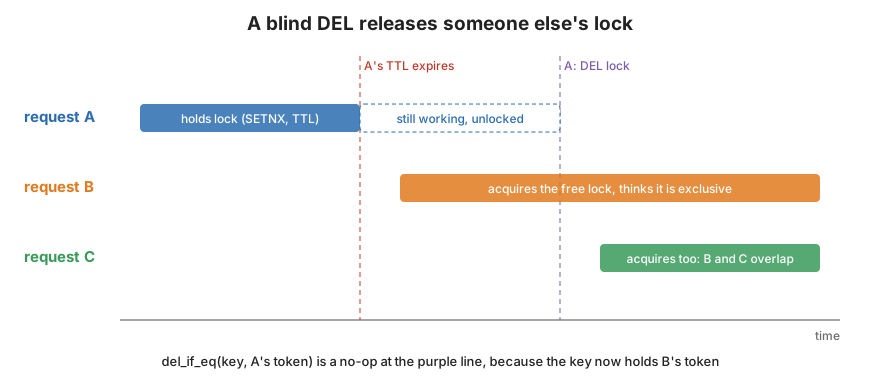
Voyage state publication in shipmates is deliberately retry-idempotent. It’s legal for several processes to publish the
same successor state at once. TestMigrateSuccessorConcurrentPublicationAndAtomicRetry does exactly that, with eight
goroutines racing MigrateSuccessor onto the same output path.
On Unix the losers just replace the winner’s file. That’s fine because it has the same content. On NTFS the
replace-existing path has to get rid of the old target. While the winner’s replace is in flight the old file sits in a
delete-pending state. A loser that shows up during that window doesn’t wait. It fails with ERROR_ACCESS_DENIED (or
ERROR_SHARING_VIOLATION).
To see how common that is, I wrote a small experiment. It runs 200 rounds of eight goroutines. Each one has its own
staged and fsynced 4 KiB temp file. They’re released at once to MoveFileEx(REPLACE_EXISTING|WRITE_THROUGH) onto the
same target, with no retries:
3) 200 rounds x 8 concurrent replacers, no retry:
   ok                           442 (27.6%)
   ERROR_ACCESS_DENIED         1158 (72.4%)
A second run gave 386 ok and 1214 ERROR_ACCESS_DENIED (75.9%). So with eight concurrent replacers, roughly three out
of four lose. That’s why DurableRename treats exactly those two errors as transient and retries. Anything else is a
real error and comes back to the caller. So do the same errors past the deadline. A genuine permission problem still
surfaces.
Two seconds wasn’t enough
The original deadline in both DurableRename and voyage’s PublishSuccessor was 2 seconds. The 8-way test passed on
its own. It failed with Access is denied only when the whole repository’s tests ran at once.
144af92 explains why. The delete-pending window lasts as
long as the winner’s fsync-heavy write takes. Under a fully loaded test suite that was observed above 9
seconds. The fix bumped DurableRename to 15 s and PublishSuccessor to 60 s, still only for classified contention
errors:
func PublishSuccessor(path string, state *State, plan *Plan, hash string) (*State, error) {
	deadline := time.Now().Add(60 * time.Second)
	for {
		published, err := publishSuccessorOnce(path, state, plan, hash)
		if err == nil || !transientFSContention(err) || time.Now().After(deadline) {
			// ...
On Unix transientFSContention is simply return false.
I wanted to see the window move with disk load on my own box. The experiment’s last part runs the same 8-way race with the retry loop (15 s deadline, 5 ms sleep). It records how long each process waited before its replace succeeded. I ran fifty rounds on an idle disk. Then I ran fifty more while 16 goroutines write, fsync and delete 1 MiB files in the same directory:
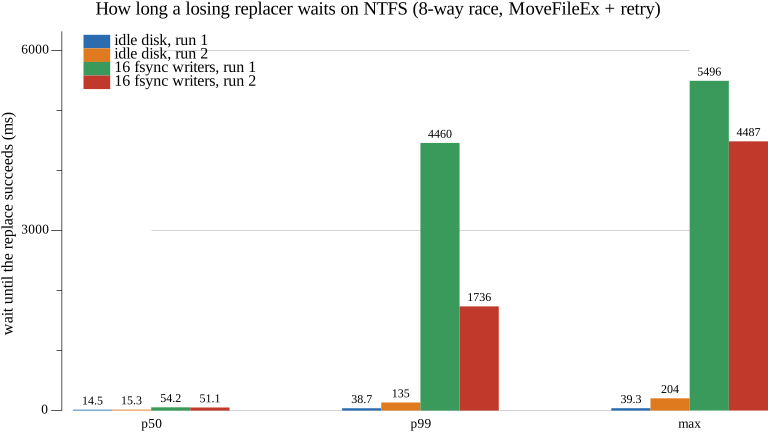
4) retry loop,  0 background fsync writers: n=400 failed=0 p50=14.523ms p99=38.7054ms max=39.3047ms
4) retry loop, 16 background fsync writers: n=400 failed=0 p50=54.2497ms p99=4.4599868s max=5.4956314s
and the second run:
4) retry loop,  0 background fsync writers: n=400 failed=0 p50=15.3158ms p99=134.9333ms max=204.3097ms
4) retry loop, 16 background fsync writers: n=400 failed=0 p50=51.0538ms p99=1.7362467s max=4.486713s
On an idle disk the worst wait was 39 ms in one run and 204 ms in the other. With the disk busy, the tail went past 4
seconds in both runs. That’s more than double the old 2 second deadline. My 16-writer load is a toy next to a full
go test ./... on a big repo. So the 9 second observation from the commit doesn’t surprise me. The median barely
moves, which is exactly why this hid. Most of the time the window is short. A deadline sized from “most of the time”
fails under load.
What about the cost of write-through?
I also timed 500 renames each way with the same staging work. At the median I couldn’t separate them. Both were about 0.52 ms in the first run. The second run’s plain-rename median landed below the timer’s resolution. Write-through had the fatter tail in both runs (p99 1.05 ms vs 0.67 ms, then 19 ms vs 1 ms). At this scale and with this timer that’s not a number I’d hang much on. For small state files that are written once per task, write-through isn’t the thing to optimize.
Takeaways
- On Windows, durable atomic replace is one call:
MoveFileEx(MOVEFILE_REPLACE_EXISTING | MOVEFILE_WRITE_THROUGH). Don’t port the directory fsync.os.Open(dir).Sync()fails withAccess is denied. Making it work means opening the directory for write withFILE_FLAG_BACKUP_SEMANTICS, which you don’t need. - Concurrent replacers of one file on NTFS see
ERROR_ACCESS_DENIED/ERROR_SHARING_VIOLATIONfrom the winner’s delete-pending file. Retry those two specifically, and nothing else. - Size retry windows for a saturated disk, not an idle one. If a test fails only when the whole suite runs, the suite is the load test you didn’t know you had.
How I measured
A standalone Go program (Go 1.26.5, golang.org/x/sys/windows) on Windows 11 Pro, AMD Ryzen 9 5950X, 128 GB RAM. The
files were on the system NTFS volume (an ADATA LEGEND 860 SSD) under my user temp directory. The program creates a
fresh directory, then runs four steps:
os.Open(dir).Sync().- 500 staged 4 KiB replacements each with
MOVEFILE_REPLACE_EXISTINGand with|MOVEFILE_WRITE_THROUGH, timing only theMoveFileExcall. - 200 rounds of 8 goroutines replacing the same target with no retry.
- 50 rounds of the same race with
DurableRename’s retry loop. First with no background load, then with 16 goroutines continuously writing, fsyncing and deleting 1 MiB files in the same directory.
I ran it twice back to back. Both runs are shown above. Separately, I opened a directory with CreateFileW and
FILE_FLAG_BACKUP_SEMANTICS twice, once GENERIC_READ and once GENERIC_READ|GENERIC_WRITE. Then I called
FlushFileBuffers on each. The first fails with error 5 and the second succeeds.
Links
416665e:DurableRename144af92: sizing the contention windows for a saturated disk- MoveFileExW (Microsoft Learn)
- FlushFileBuffers (Microsoft Learn)